Pioneer in Offering CRM Solutions since 2010...
Pioneer in Offering CRM Solutions since 2010...
 ChatGPT Development
 Claude AI Development
 Gemini AI Development
 Microsoft Copilot Development
 DeepSeek AI Development
 LangChain Development
 CrewAI Development
 AutoGen Development
 LangGraph Development
 Pinecone Development
 Weaviate Development
 AI Workflow Automation
 Qdrant Development
 Cursor AI Consulting
 GitHub Copilot Consulting
 Enterprise AI Search (Soon)
ChatGPT Development
Claude AI Development
Gemini AI Development
Microsoft Copilot Development
DeepSeek AI Development
LangChain Development
CrewAI Development
AutoGen Development
LangGraph Development
Pinecone Development
Weaviate Development
AI Workflow Automation
Qdrant Development
Cursor AI Consulting
GitHub Copilot Consulting
Enterprise AI Search (Soon)
ChatGPT Development
Claude AI Development
Gemini AI Development
Microsoft Copilot Development
DeepSeek AI Development
LangChain Development
CrewAI Development
AutoGen Development
LangGraph Development
Pinecone Development
Weaviate Development
AI Workflow Automation
Qdrant Development
Cursor AI Consulting
GitHub Copilot Consulting
How a two-way integration turned a won deal into a fully tracked survey, sales order, installation and support lifecycle, with no re-keying between systems.
Choice2mobile Technology Ltd provides residential and business internet across Lagos. Its sales team works in Bitrix24, while surveys, sales orders, installations and customer support run in Odoo. Every customer passes through both systems: a lead is won in Bitrix24, then an engineer surveys the site, finance approves the order and collects payment, a field team installs the service, and the support desk looks after the customer afterwards.

Before the integration, the hand-off between sales and operations depended on people copying information from one system into the other. That created several recurring problems:
Every won lead had to be retyped into Odoo as a survey ticket, and again later as a sales order and installation job.
Sales staff in Bitrix24 could not see whether a survey had been done, an order approved, or an installation finished without asking the operations team.
Confirmation that a customer had paid lived in Odoo, so sales could not reliably follow up or close the loop with the customer.
Support requests logged against a customer in Bitrix24 had to be recreated in Odoo before engineers could act on them.
OCE built a set of REST API endpoints in Odoo and a matching push mechanism back to Bitrix24. Bitrix24 calls Odoo when a commercial event happens (a lead is won, an order is requested, a support case is opened, an installation is closed). Odoo pushes status back to Bitrix24 whenever a ticket changes stage, a survey completes, or a payment is recorded. The integration covers four connected workflows, shown below.
| Workflow | Started by | Odoo → Bitrix24 | Bitrix24 → Odoo |
|---|---|---|---|
| Survey Ticket | Lead marked Won in Bitrix24 | Stage updates; survey completion status | Create survey ticket |
| Sales Order | Bitrix24 create-order API call | Approval and payment information | Create sales order linked to the survey ticket |
| Installation Ticket | Odoo, after order approval and payment | Draft ticket details; stage updates | Close ticket |
| Support Ticket | Support ticket raised in Bitrix24 | Stage updates; resolution status | Create support ticket |
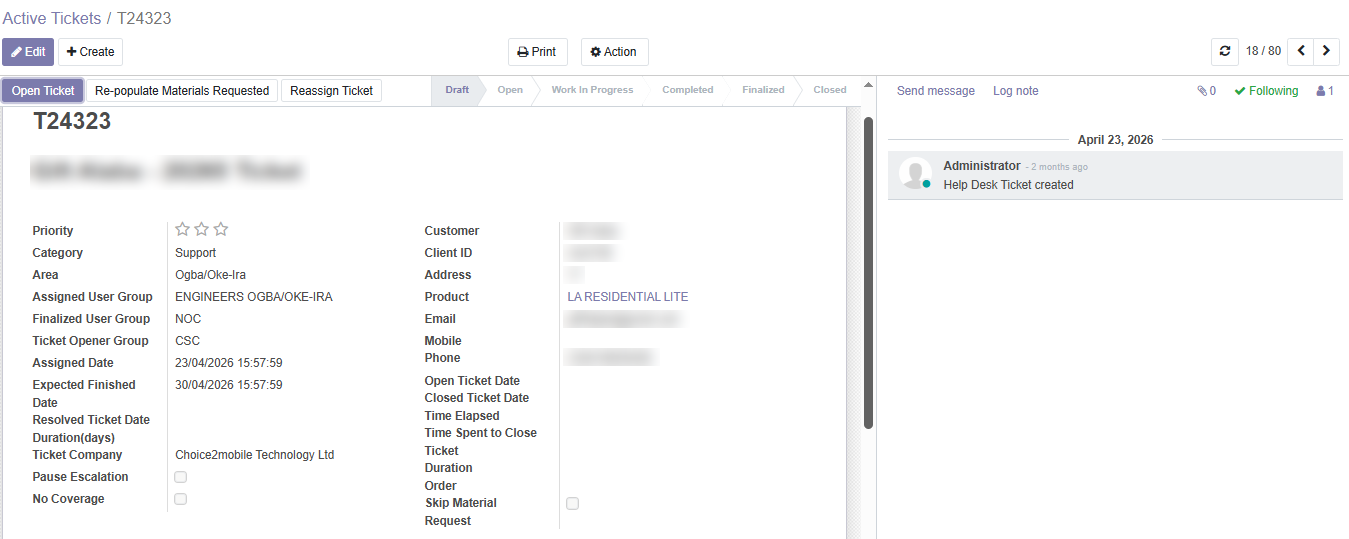
Live screenshots from Odoo ERP showing automated ticket creation, line items, assignment groups, SLA targets, and complete stage audit trails.
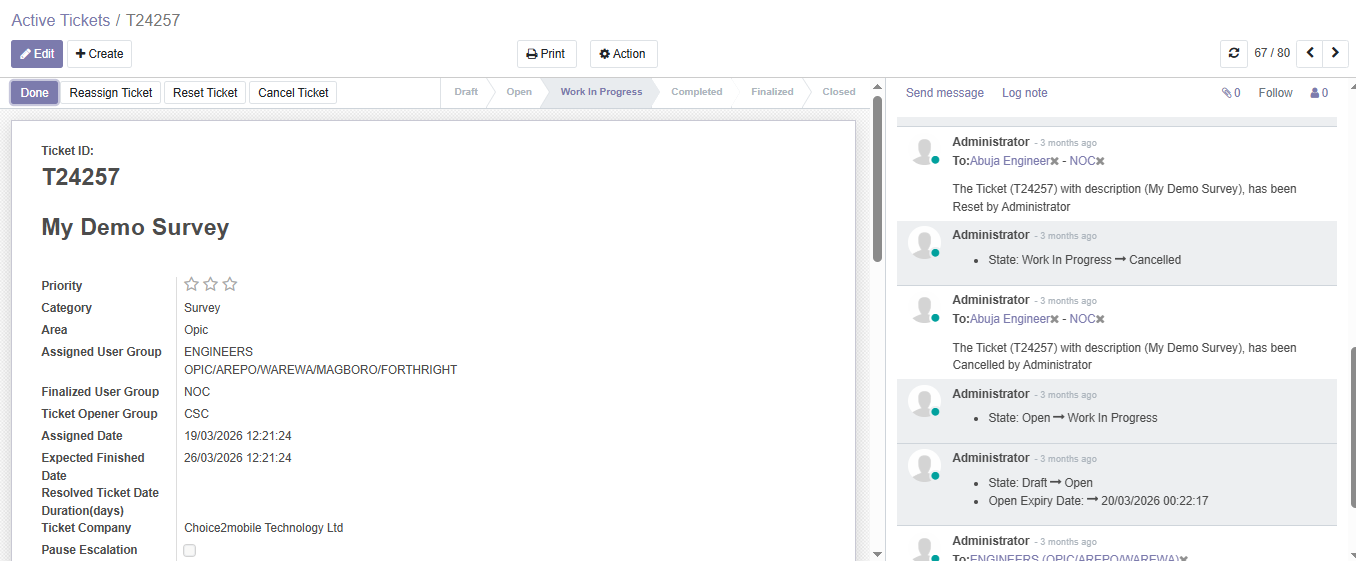
The customer journey begins the moment a sales representative wins a lead in Bitrix24.
When a lead is marked Won in Bitrix24, it calls the Odoo API and a new survey ticket is created automatically, already assigned to the right engineering group for the area.
As the ticket moves through Draft, Open, Work In Progress, Completed, Finalized and Closed in Odoo, each stage change is pushed to Bitrix24.
When the survey is done, Odoo calls the push API and sends the completion status to Bitrix24, so the sales team knows the site is ready to quote.
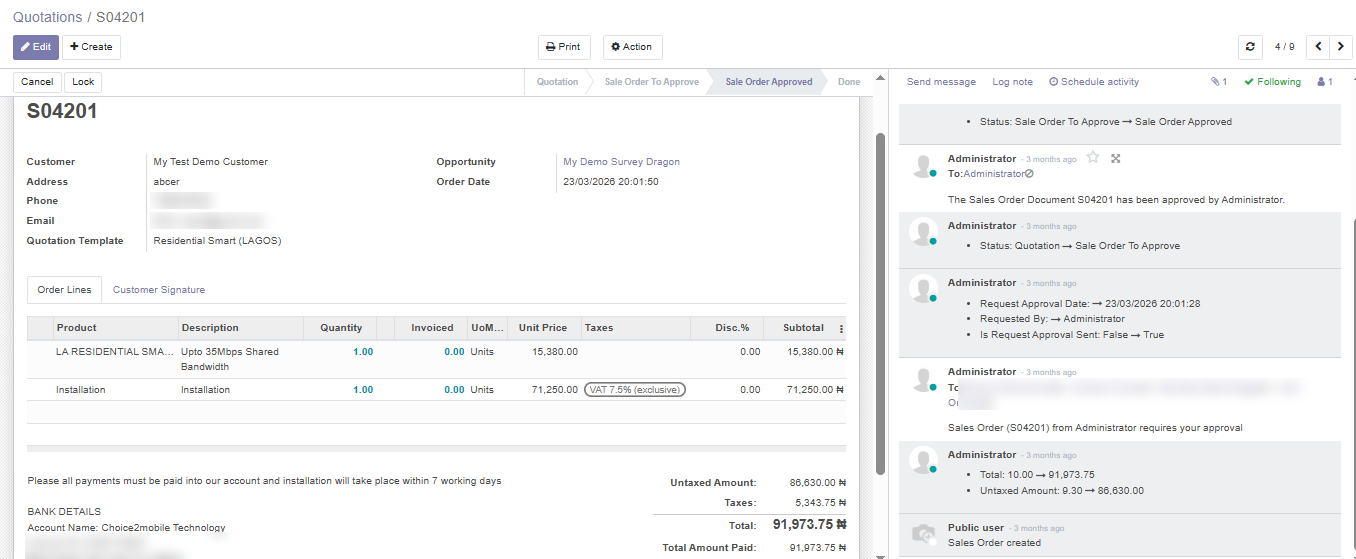
Once the survey confirms the site, the commercial order is raised from Bitrix24 and executed in Odoo.
Bitrix24 calls the create-sales-order API, and Odoo creates the sales order with a direct reference to the original survey ticket and opportunity.
When the order is approved and payment is recorded in Odoo, Odoo calls the push API and sends the payment information to Bitrix24.
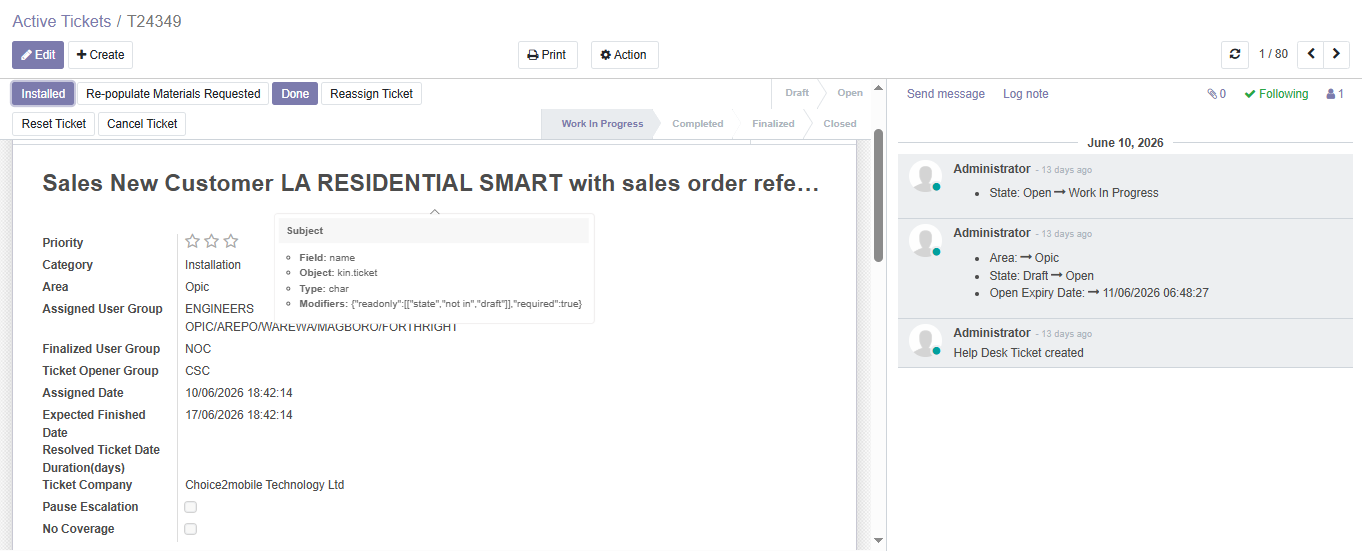
Payment unlocks installation. No one needs to remember to schedule the job.
When the sales order is approved and paid, Odoo creates a draft installation ticket and pushes its details to Bitrix24.
As the field team moves the ticket through its stages in Odoo, every update is reflected in Bitrix24.
When the installation is confirmed and closed in Bitrix24, it calls the close API and the matching ticket in Odoo is closed too.
After go-live, customer support follows the same connected pattern.
When a support ticket is created in Bitrix24, it calls the Odoo API and a support ticket is created with the customer, product and service area filled in.
Each stage change in Odoo is pushed to Bitrix24 so account owners can see progress.
When the support work is done, Odoo calls the push API and sends the final status to Bitrix24.
Together, the four workflows form one continuous chain from first sale to ongoing support:
Survey tickets, sales orders, installation tickets and support tickets are created through the API instead of being retyped.
Sales staff see survey, payment, installation and support status inside Bitrix24 without switching systems or chasing colleagues.
Installation work starts only once an order is approved and paid, and it starts automatically.
Every record links back to the one before it, and every stage change is logged in Odoo’s chatter, giving a complete audit trail per customer.
Each team keeps working in the system built for its job, while both systems stay consistent.
Role: CRM: leads, deals, customer communication, installation confirmation
Role: ERP: survey, sales, approvals, invoicing and payment, helpdesk and field tickets
Role: Inbound calls from Bitrix24: create survey ticket, create sales order, create support ticket, close ticket
Role: Outbound updates from Odoo: stage changes, survey and support completion, payment, draft installation ticket
OCE (Open Cloud Experts) designs and delivers Odoo and CRM implementations and integrations for healthcare, manufacturing, eCommerce, telecom and government-contracting teams. Talk to us about connecting your sales and operations platforms.







Our sales manager reaches out to you within a few days after analyzing your business requirements.
Meanwhile, we sign an NDA to ensure the highest level of privacy.
Our pre-sale manager presents project estimates and an approximate timeline.


 AI Consulting Services
 RAG Development
 LLM Development
 AI App Development
 AI Software Development
 AI Integration Services
 AI Agent Development
 AI Chatbot Development
 LLM Fine-Tuning
 Generative AI Integration
 AI Copilot Development
 Data Analytics
 Data Warehousing
 Data Annotation
 AIOps
AIOps
 DevOps Consulting
 DevOps Automation
 SRE
SRE
 LLM Observability
 AI for Healthcare
 AI for CRM
 AI for Customer Support
 AI for Manufacturing
 AI for Real Estate
 AI for Education
 AI for Finance
 AI for E-Commerce
 AI/ML Consulting
 Object Detection
 ChatBot Development
 Computer Vision
 Natural Language Processing
 Data and Ai
 Mobile Apps Development
 Chrome Extension Development
 Odoo Development Services
 Odoo Implementation Services
 Odoo Customization Services
 Odoo Integration Services
 Odoo Migration & Upgrade Services
 Odoo ERP Consulting Services
 Odoo Support and Maintenance Services
 Odoo AI & Automation Services
 Salesforce Consulting
 Salesforce Product
 Salesforce Case Study
 SuiteCRM Consulting
 SuiteCRM Addons
 Devops
 AWS Consulting
 Digital Ocean Consulting
 OnPrem. Server Support
 Cloud Migration Services
 Salesforce WhatsApp Business API
 Salesforce WhatsApp Web Integration
 Salesforce Telephony Integration
 Dentrix To GHL
 Outlook Integration
 MindBody Integration
 Zillow Integration
 Open Dental To GHL
 Number Plate Recognition
 Taxi App & Mobility
 Smart Bus & Fleet System
 HR Solutions (Salesforce)
 Quick HRMS (SuiteCRM)
 CRM For Telecom Industry
 CRM For Travel
 CRM For Call Center
 CRM For Education
 CRM For Healthcare
 CRM For Clinics
 CRM For Locksmith
 CRM For Law
 NodeJS
 Python
 .NET
.NET
 Classic ASP
 Core PHP
 ReactJS
 AngularJs
 Android
 iOS
iOS
 Flutter
 React Native
 AR/VR
AR/VR
 CodeIgniter
 Laravel
 Hire .NET Core Developer
 Hire Salesforce Developer
 Hire Odoo Developers
 CRM For Legal Practice
 Online Photo Booking System
 Task Scheduler for Construction Industry
 Patient Management Software
 Dentist Management System
 Food Delivery App
 CRM For Aviation Company
 Salesforce Marketing Cloud for Online Retail Store
 Salesforce Implementation & Customization For RFID Supplier
 Ecommerce System Integration With ERP
 CRM For Real Estate Company
 Find Nearby Salon
 Taxi Booking App
 CRM For Travel Agency
 Case Management Software
 Engineering Company Website
 CRM For Telecom Industry
 Company Profile
 SuiteCRM Profile
 Telco CRM white paper
 AI enabled speech analysis