Pioneer in Offering CRM Solutions since 2010...
Pioneer in Offering CRM Solutions since 2010...
 ChatGPT Development
 Claude AI Development
 Gemini AI Development
 Microsoft Copilot Development
 DeepSeek AI Development
 LangChain Development
 CrewAI Development
 AutoGen Development
 LangGraph Development
 Pinecone Development
 Weaviate Development
 AI Workflow Automation
 Qdrant Development
 Cursor AI Consulting
 GitHub Copilot Consulting
 Enterprise AI Search
ChatGPT Development
Claude AI Development
Gemini AI Development
Microsoft Copilot Development
DeepSeek AI Development
LangChain Development
CrewAI Development
AutoGen Development
LangGraph Development
Pinecone Development
Weaviate Development
AI Workflow Automation
Qdrant Development
Cursor AI Consulting
GitHub Copilot Consulting
Enterprise AI Search
Enterprise AI Search
ChatGPT Development
Claude AI Development
Gemini AI Development
Microsoft Copilot Development
DeepSeek AI Development
LangChain Development
CrewAI Development
AutoGen Development
LangGraph Development
Pinecone Development
Weaviate Development
AI Workflow Automation
Qdrant Development
Cursor AI Consulting
GitHub Copilot Consulting
Enterprise AI Search
How an integrated AI assistant helps sales, support and customer service teams access AI assistance without leaving their CRM workflow
Sales, support and customer service teams frequently need assistance while working with customer records and performing everyday CRM activities.
Users may need to find information, prepare customer communication, rewrite messages, summarize content or generate responses. Traditionally, these tasks may require users to switch between the CRM and an external AI application.
CTAIChatter introduces an AI-powered communication and collaboration experience directly into the CRM.
Users can interact with an AI assistant through a centralized CRM interface, enter questions or instructions, and receive AI-generated responses without leaving the CRM environment.
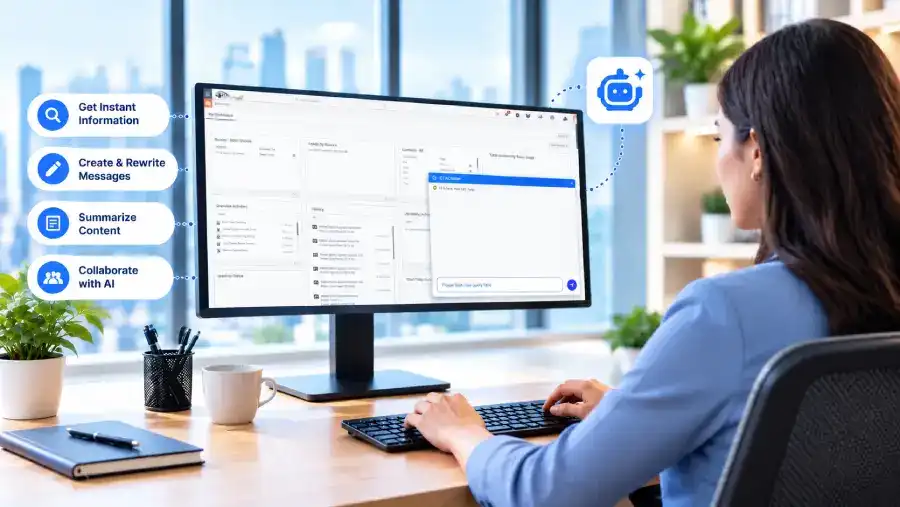
The solution is designed to make AI more accessible within everyday CRM operations while reducing application switching and repetitive manual work.
CRM users often require assistance while working with customer records and daily CRM activities.
Traditionally, users may need to open a separate AI application, copy information from the CRM, provide instructions, receive a response and then return to the CRM.
Users need rapid answers about customer accounts, ongoing inquiries, and history without navigating through complex menu hierarchies.
Drafting tailored emails, outreach messages, and follow-ups takes considerable time when started from a blank text box.
Sales reps and agents frequently face complex transaction histories, extensive notes, and multi-threaded support tickets.
Crafting timely, professional replies to client questions requires consistent effort across high-volume customer service desks.
Adjusting tone, refining grammar, and making technical descriptions easy to understand for clients requires tedious manual revisions.
Condensing voluminous discussion history, audit logs, or previous tickets into actionable takeaways requires significant reading time.
The QA challenge was to validate a workflow that depends on natural-language interpretation, CRM records, external AI services, visualization, and file exports. Testing covered the full journey from installation and licensing through query submission, data validation, visualization, and export.
Automation was introduced to support repeatable regression testing of core AI Chatter workflows, including CRM navigation, provider configuration, query submission, response validation, CRM result checks, tables, charts, CSV export, PNG export, and positive and negative scenarios.
Extension installation and availability
Activation, status, invalid and empty keys
Provider, API URL, API key, model, saving, and provider switching
Natural-language requests and response display
Record ID, module, title, status, priority, severity, created time, and other returned fields
Credentials, responses, timeouts, failures, unsupported models, and provider availability
Chart generation and displayed CRM data
CSV result export and PNG chart export
Invalid queries, configuration failures, and existing CRM workflow checks
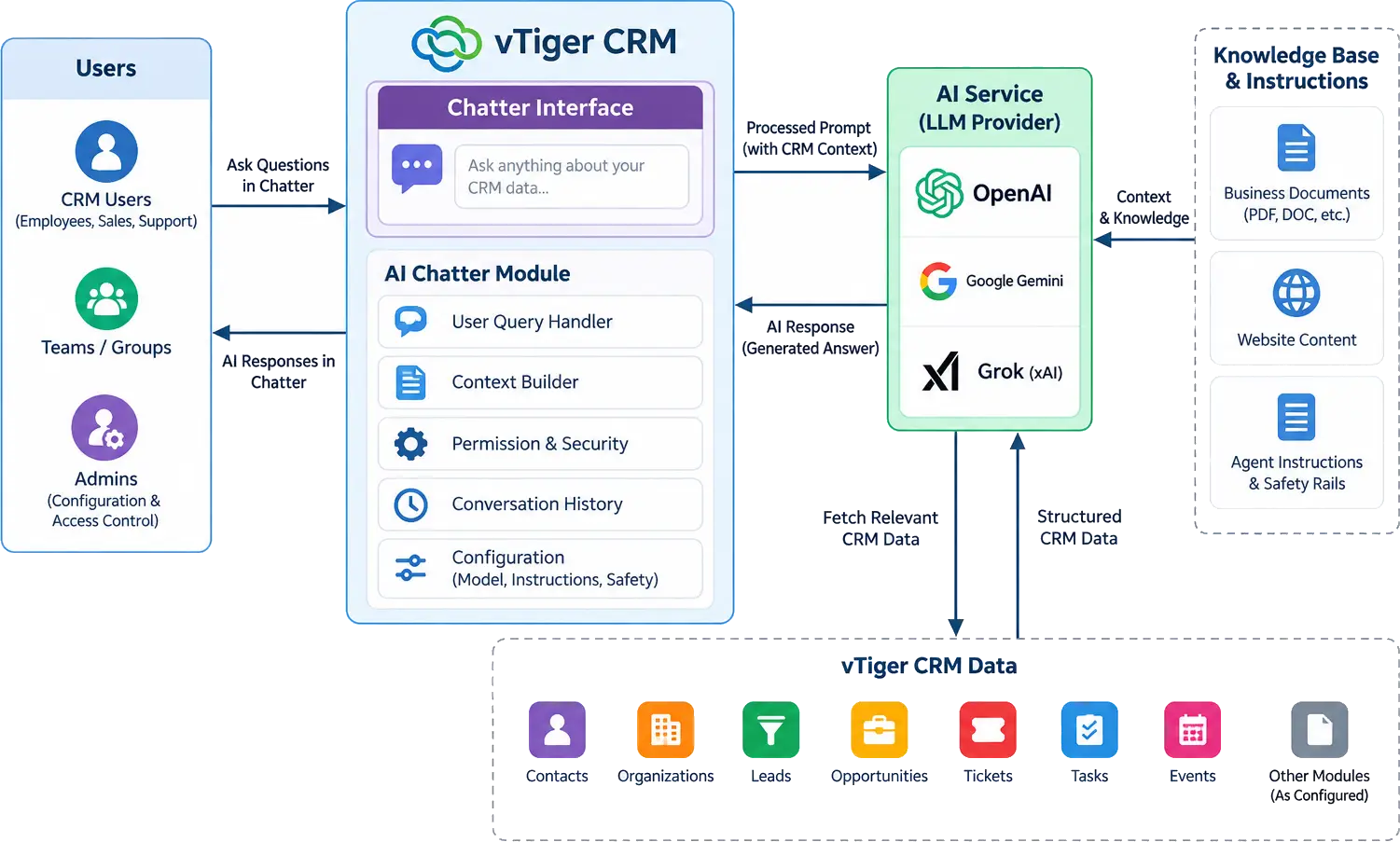
CTAIChatter provides an AI-powered assistant directly inside the CRM.

CTAIChatter provides a unified interface within the CRM, allowing users to interact with a configured AI provider without leaving their existing workspace.
Users can ask questions, draft customer communications, rewrite messages, summarize information, and request assistance with CRM-related tasks using simple, natural language prompts.
CTAIChatter processes user requests through the configured AI provider and displays responses directly within the CRM. Users can review, refine, and use the generated content without switching between applications.
The objective was not to replace CRM users. The objective was to provide users with an AI assistant that can help them complete everyday CRM tasks more efficiently.
Get quick answers to queries using natural language, helping users understand information and resolve questions while working within the CRM.
Create new content, including customer emails, professional messages, notes, and other CRM-related text based on user instructions.
Refine existing text by improving clarity, correcting grammar, restructuring sentences, and adapting the wording to suit the intended purpose.
Enhance customer-facing communication by adjusting tone, improving professionalism, and making messages clearer, more concise, and appropriate for the audience.
Condense lengthy text into concise, meaningful summaries, making important details easier to understand and helping users process information efficiently.
Draft relevant responses to customer inquiries, business communications, and other messages based on the context and instructions provided by the user.
Access AI support while performing everyday CRM tasks, enabling users to ask questions, refine content, and receive contextual assistance without switching between applications.
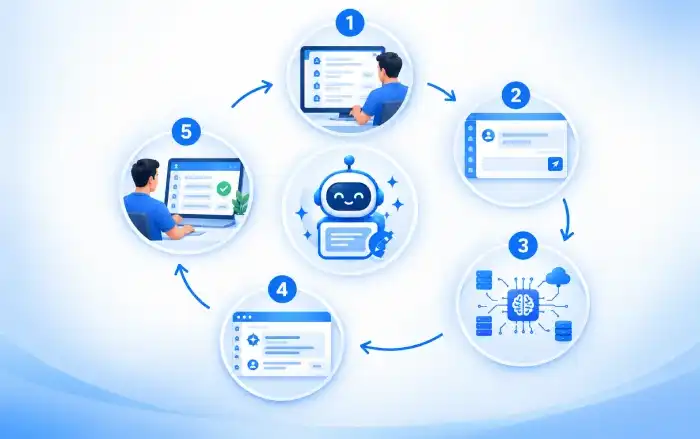
Users access CTAIChatter from within the CRM environment.
The AI interface provides a dedicated space for interacting with the configured AI provider.
The user enters a question, instruction or request.
For example: "Create a professional response for this customer."
The request is sent to the configured AI service.
The AI processes the request and generates a response.
The generated response is displayed directly inside the CRM.
The user reviews the response and uses it for the required CRM activity.
| Capability | Description & Operational Function |
|---|---|
| AI-Powered Conversations | Users can communicate with the AI assistant using natural language. Instead of navigating through multiple applications, users can simply ask the AI for assistance. |
| Centralized AI Assistant | AI functionality is available through a centralized CRM interface. This provides users with a consistent AI experience across their daily CRM activities. |
| AI Provider Configuration | The solution is designed around configurable AI providers. This gives organizations flexibility when selecting their preferred AI technology. |
| AI API Configuration | Administrators can configure the required AI provider and credentials through CRM settings. |
| User-Friendly Interface | The assistant provides a dedicated interface for entering requests and viewing AI-generated responses. |
| License and Configuration Management | The solution includes configuration and license management functionality for controlling the AI feature within the CRM environment. |
The support agent reviews the content and uses it for customer communication.
"The customer is asking for an update on their issue."
"Create a professional response telling the customer that our team is investigating the issue and we will provide an update soon."
The agent does not need to manually compose the response or switch to an external AI application.

A salesperson wants to prepare a follow-up message after a customer discussion.
"Create a short and professional follow-up message after today's discussion."
CTAIChatter generates the requested content.
The salesperson can review the response and use it for the customer follow-up.
This reduces the time required to prepare repetitive sales communication.

CRM users may also need help understanding or summarizing information.
"Summarize this information in five bullet points."
The AI generates a concise summary that allows the user to understand the information more quickly.
This can be useful when users are working with larger amounts of CRM information.

CTAIChatter combines AI assistance with the existing CRM environment.
CTAIWriter can support multiple AI providers instead of depending on a single AI platform.






Navigate modules and apply filters manually.
Ask for CRM information using natural language.
Review records manually to find relevant data.
Receive structured AI-assisted results for validation.
Prepare charts and reports separately.
Generate charts from supported queries.
Manually prepare shareable output.
Download structured results as CSV and charts as PNG.
Configure separate provider integrations independently.
Manage supported AI-provider settings within the product configuration.
Repeat manual regression checks.
Use automated regression scenarios for key workflows.
Users can access AI assistance directly from the CRM while performing their daily activities.
Users no longer need to repeatedly move information between the CRM and external AI applications.
AI can help users prepare customer responses, sales messages and other content more quickly.
Users can leverage AI to create clearer, more professional and consistent communication.
AI becomes part of the existing CRM workflow instead of requiring users to work with a separate application.
Administrators can manage AI configuration from within the CRM environment.
Organizations can support different AI providers based on their business and technical requirements.
The new workflow reduces context switching and removes unnecessary copy-and-paste steps.
CTAIChatter provides centralized configuration and administration capabilities within the CRM.
Organizations can manage:
CTAIChatter provides a foundation for expanding AI capabilities across the CRM.
CRM Context Awareness
The AI could access permitted CRM information such as:







Our sales manager reaches out to you within a few days after analyzing your business requirements.
Meanwhile, we sign an NDA to ensure the highest level of privacy.
Our pre-sale manager presents project estimates and an approximate timeline.


 AI Consulting Services
 RAG Development
 LLM Development
 AI App Development
 AI Software Development
 AI Integration Services
 AI Agent Development
 AI Chatbot Development
 LLM Fine-Tuning
 Generative AI Integration
 AI Copilot Development
 Data Analytics
 Data Warehousing
 Data Annotation
 AIOps
AIOps
 DevOps Consulting
 DevOps Automation
 SRE
SRE
 LLM Observability
 AI for Healthcare
 AI for CRM
 AI for Customer Support
 AI for Manufacturing
 AI for Real Estate
 AI for Education
 AI for Finance
 AI for E-Commerce
 AI/ML Consulting
 Object Detection
 ChatBot Development
 Computer Vision
 Natural Language Processing
 Data and Ai
 Mobile Apps Development
 Chrome Extension Development
 Odoo Development Services
 Odoo Implementation Services
 Odoo Customization Services
 Odoo Integration Services
 Odoo Migration & Upgrade Services
 Odoo ERP Consulting Services
 Odoo Support and Maintenance Services
 Odoo AI & Automation Services
 Salesforce Consulting
 Salesforce Product
 Salesforce Case Study
 SuiteCRM Consulting
 SuiteCRM Addons
 Devops
 AWS Consulting
 Digital Ocean Consulting
 OnPrem. Server Support
 Cloud Migration Services
 Salesforce WhatsApp Business API
 Salesforce WhatsApp Web Integration
 Salesforce Telephony Integration
 Dentrix To GHL
 Outlook Integration
 MindBody Integration
 Zillow Integration
 Open Dental To GHL
 Number Plate Recognition
 Taxi App & Mobility
 Smart Bus & Fleet System
 HR Solutions (Salesforce)
 Quick HRMS (SuiteCRM)
 CRM For Telecom Industry
 CRM For Travel
 CRM For Call Center
 CRM For Education
 CRM For Healthcare
 CRM For Clinics
 CRM For Locksmith
 CRM For Law
 NodeJS
 Python
 .NET
.NET
 Classic ASP
 Core PHP
 ReactJS
 AngularJs
 Android
 iOS
iOS
 Flutter
 React Native
 AR/VR
AR/VR
 CodeIgniter
 Laravel
 Hire .NET Core Developer
 Hire Salesforce Developer
 Hire Odoo Developers
 CRM For Legal Practice
 Online Photo Booking System
 Task Scheduler for Construction Industry
 Patient Management Software
 Dentist Management System
 Food Delivery App
 CRM For Aviation Company
 Salesforce Marketing Cloud for Online Retail Store
 Salesforce Implementation & Customization For RFID Supplier
 Ecommerce System Integration With ERP
 CRM For Real Estate Company
 Find Nearby Salon
 Taxi Booking App
 CRM For Travel Agency
 Case Management Software
 Engineering Company Website
 CRM For Telecom Industry
 Company Profile
 SuiteCRM Profile
 Telco CRM white paper
 AI enabled speech analysis