Pioneer in Offering CRM Solutions since 2010...
Pioneer in Offering CRM Solutions since 2010...
 ChatGPT Development
 Claude AI Development
 Gemini AI Development
 Microsoft Copilot Development
 DeepSeek AI Development
 LangChain Development
 CrewAI Development
 AutoGen Development
 LangGraph Development
 Pinecone Development
 Weaviate Development
 AI Workflow Automation
 Qdrant Development
 Cursor AI Consulting
 GitHub Copilot Consulting
 Enterprise AI Search
ChatGPT Development
Claude AI Development
Gemini AI Development
Microsoft Copilot Development
DeepSeek AI Development
LangChain Development
CrewAI Development
AutoGen Development
LangGraph Development
Pinecone Development
Weaviate Development
AI Workflow Automation
Qdrant Development
Cursor AI Consulting
GitHub Copilot Consulting
Enterprise AI Search
Enterprise AI Search
ChatGPT Development
Claude AI Development
Gemini AI Development
Microsoft Copilot Development
DeepSeek AI Development
LangChain Development
CrewAI Development
AutoGen Development
LangGraph Development
Pinecone Development
Weaviate Development
AI Workflow Automation
Qdrant Development
Cursor AI Consulting
GitHub Copilot Consulting
Enterprise AI Search
How AI-powered profile analysis transforms CRM data into a standardized score and visual rating to support faster sales and customer decisions
Sales and customer-facing teams often manage large volumes of leads, contacts, accounts and opportunities. Evaluating the quality and potential of each CRM record manually can require significant time and may result in inconsistent assessments between users.
AI Profile Scoring introduces an intelligent scoring layer directly into the CRM.
The solution analyzes configured CRM information and generates a Profile Score from 0 to 100. The score is also represented through a visual five-star rating, allowing users to understand the profile at a glance.

The feature can be enabled across multiple CRM modules, including Leads, Contacts, Organizations / Accounts and Opportunities.
Users can also select multiple records from a CRM list view and calculate scores in bulk, making the solution suitable for organizations managing large CRM datasets.
The project addressed several common CRM evaluation challenges:

The scoring workflow must behave consistently across modules, field configurations, record selections, and data scenarios
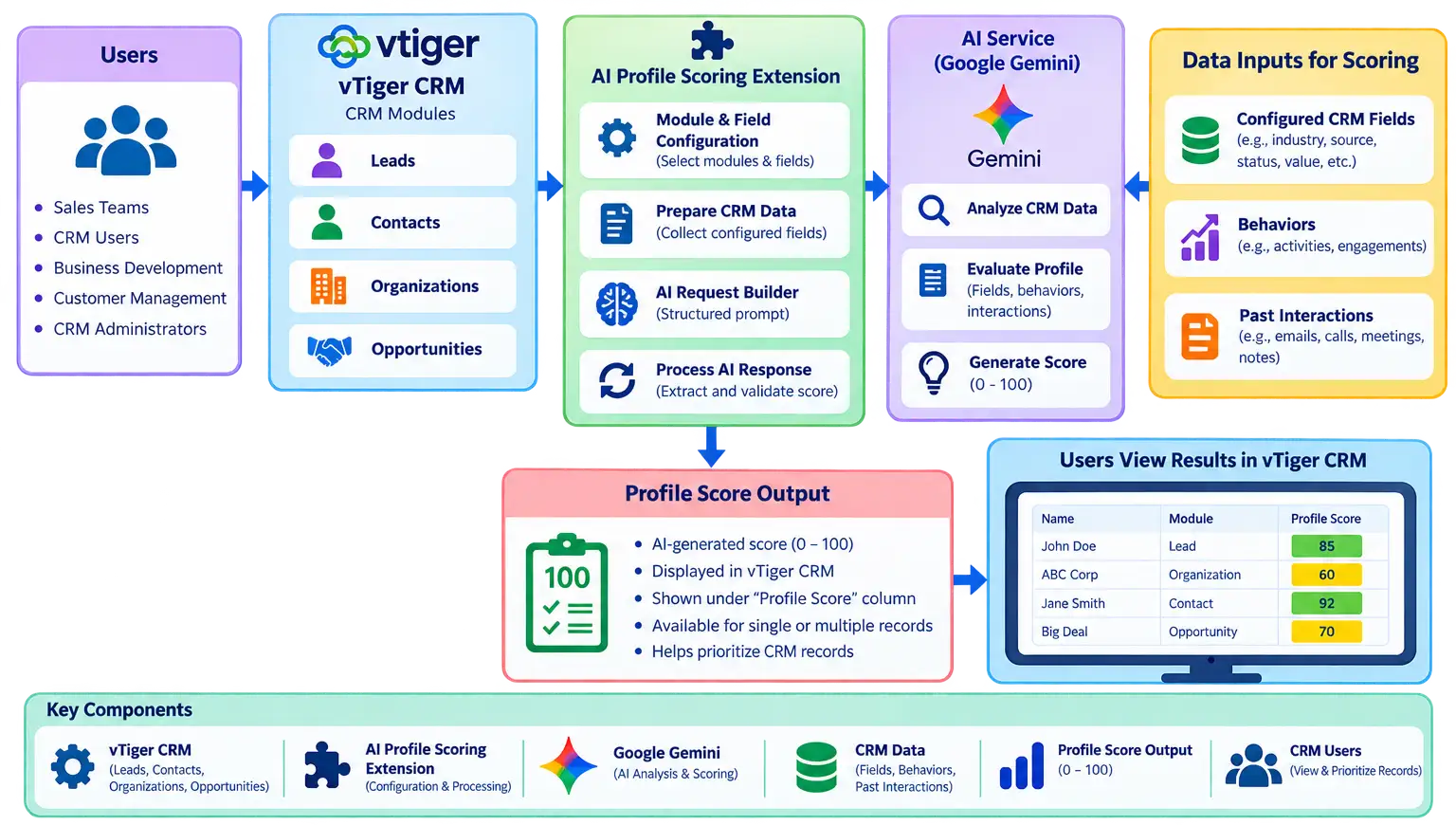
AI Profile Scoring adds an automated scoring capability directly into the CRM. Administrators can configure the CRM modules and fields that should be considered during profile evaluation.
The AI analyzes the configured information and generates a score between 0 and 100, which is stored within the CRM and presented through a visual five-star rating.
0–100 Numerical & Five-Star Visual Scale
The objective was not to replace sales judgment.
The objective was to reduce the manual effort required to evaluate CRM records and provide users with an additional standardized signal.
AI acts as an evaluation assistant by analyzing configured CRM information and converting it into a simple score..
Users can then combine the score with their existing CRM knowledge and business processes when deciding which records require attention.
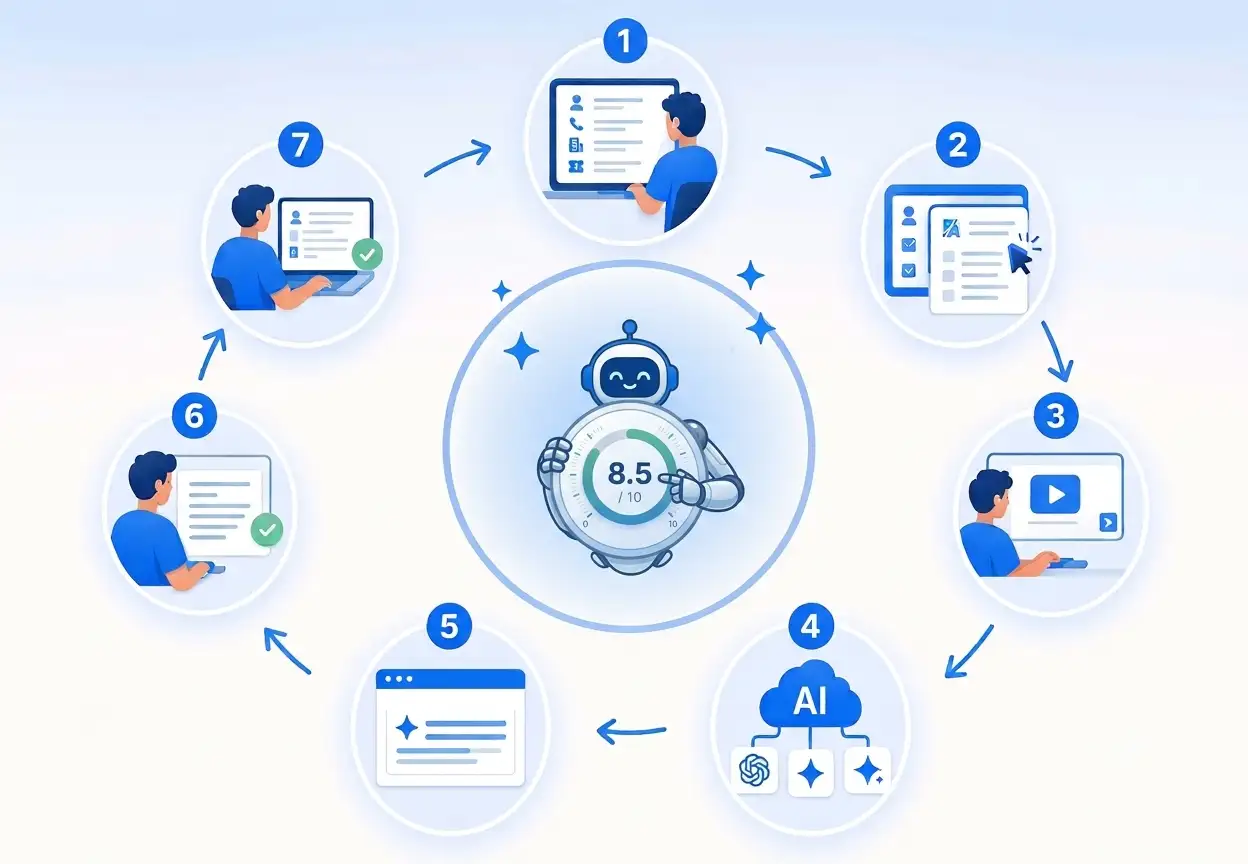
An administrator enables AI Profile Scoring for the required CRM modules. The organization can determine where the scoring functionality should be available.
Real-time booking, provider scheduling, chair allocation, status changes (booked, arrived, completed, no-show).The administrator configures the fields that should be considered when generating the profile score. Different modules can use different information based on their business purpose.
Users can select one or multiple records from a CRM list view. This allows multiple profiles to be evaluated without opening each record individually.
The user selects the Calculate Profile Score option. The configured CRM information is sent for AI-based analysis.
The AI generates a profile score between 0 and 100.
The generated score is stored in the CRM and displayed to users. The numerical score can also be represented using the five-star visual rating.
Uses the configured CRM information.
Select appropriate modules and fields.
Analyzes selected CRM information
Ensure the configured data is relevant.
Generates a score from 0–100.
Review the score as an additional business signal.
Converts the score into an understandable rating.
Validate queries against actual business data.Interpret the rating in business context.
Helps identify higher- and lower-scoring profiles.
Make the final sales or business decision.
Consider an organization with 1,000 leads. A sales representative needs to identify which profiles have stronger information and potentially require earlier attention. Instead of manually reviewing every lead, AI Profile Scoring can analyze the configured lead information.
AI Profile Scoring can also be applied to CRM opportunities. An organization can configure opportunity-related dimensions such as:
A key capability of the solution is the ability to calculate scores for multiple selected CRM records.
For example, a user can select 50 leads from a CRM list view and initiate profile scoring.
Instead of opening and processing each record individually, the scoring process can be initiated directly from the list view. This makes the feature particularly useful for organizations with large CRM datasets.
AI Profile Scoring can be configured across multiple CRM entities.
QA combined manual validation with automated regression coverage to check the feature's core user journey and its integration with vTiger CRM.
The framework is designed to keep test scripts reusable and maintainable. The source documents do not provide verified test counts, execution pass rates, defect totals, or measured coverage percentages, so none are claimed here.
Playwright Browser automation for web application testing.
TypeScript: Type-safe scripting for automated test development
Page Object Model (POM) Structured design for reusable and maintainable test scripts.
Functional, UI, integration, negative, and regression validation
Automated Test Reports Test execution results with pass/fail status and error details.
Administrators maintain total control over where AI Profile Scoring is available. The configuration approach allows organizations to:
Tangible operational improvements delivered across the entire CRM workflow.
Users quickly understand CRM profile quality without manually reviewing every individual configured field.
AI-based scoring provides a standardized, objective approach to evaluating profiles across users and teams.
Sales teams spend substantially less time manually reviewing, verifying and comparing CRM information.
The score delivers a high-confidence signal helping reps identify which high-value leads or opportunities require fast follow-up.
Existing CRM information is synthesized into an actionable, instantly interpretable business signal.
Bulk scoring makes it practical to evaluate thousands of CRM records in bulk without opening each record one-by-one.
The five-star rating makes profile quality immediately understandable to sales reps and leadership alike.
A company manages high volumes of CRM records across multiple modules:
Inbound and marketing lead records requiring qualification and initial outreach.
Key customer contacts and decision-maker profiles across ongoing engagements.
Enterprise and corporate client accounts with varying levels of profile completeness.
Active pipeline deals at various stages of evaluation and negotiation.
Sales managers need a simple way to identify profiles that contain stronger business information.

Sales representatives manually review CRM records and determine which profiles appear stronger.
Sales representatives manually review CRM records and evaluate individual fields one by one.
Reps individually determine which profiles appear stronger based on their own personal assessment.
This requires significant time and may result in different evaluations between users.
This requires significant time and may result in different evaluations between users.

The organization configures the relevant CRM fields and enables AI Profile Scoring. The system evaluates the configured information and generates scores.
The organization configures the relevant CRM fields and enables AI Profile Scoring.
The system evaluates the configured information and generates scores.
The sales team now has an additional standardized signal that can be considered alongside existing CRM information.

The core value comes from converting multiple fragmented CRM fields into a simple decision-support indicator.
AI Profile Scoring establishes a flexible foundation for advanced AI-powered CRM capabilities.
Provides actionable reasoning behind each score:
Why the profile received the score, Which fields contributed positively, Which information is missing, Actionable steps to improve score
Organizations can define specialized scoring formulas and weightings tailored to specific business units or product lines.
Maintains a timestamped audit log of historical scores to track how an account or opportunity matures over the sales cycle.
Scores automatically recalculate when critical CRM fields, deal sizes or engagement triggers update in real time.
Profile scores seamlessly trigger native CRM routing rules and automation triggers.
Executive dashboards provide deep operational visibility:
Average profile score across pipeline, Tier distribution & score trends, High-score lead volume tracking, Team-wise scoring performance
Generates context-aware next steps alongside the score to help sales reps close missing data gaps.
AI Profile Scoring is designed to empower human judgment rather than replace it. Sales teams remain in full control of:
AI Profile Scoring transforms existing CRM information into a simple and actionable indicator.
The solution provides sales and CRM teams with a standardized way to understand profile quality while making better use of information that already exists within the CRM. The ability to perform bulk scoring also makes the solution suitable for organizations managing large numbers of CRM records.
Instead of requiring users to manually evaluate every record:







Our sales manager reaches out to you within a few days after analyzing your business requirements.
Meanwhile, we sign an NDA to ensure the highest level of privacy.
Our pre-sale manager presents project estimates and an approximate timeline.


 AI Consulting Services
 RAG Development
 LLM Development
 AI App Development
 AI Software Development
 AI Integration Services
 AI Agent Development
 AI Chatbot Development
 LLM Fine-Tuning
 Generative AI Integration
 AI Copilot Development
 Data Analytics
 Data Warehousing
 Data Annotation
 AIOps
AIOps
 DevOps Consulting
 DevOps Automation
 SRE
SRE
 LLM Observability
 AI for Healthcare
 AI for CRM
 AI for Customer Support
 AI for Manufacturing
 AI for Real Estate
 AI for Education
 AI for Finance
 AI for E-Commerce
 AI/ML Consulting
 Object Detection
 ChatBot Development
 Computer Vision
 Natural Language Processing
 Data and Ai
 Mobile Apps Development
 Chrome Extension Development
 Odoo Development Services
 Odoo Implementation Services
 Odoo Customization Services
 Odoo Integration Services
 Odoo Migration & Upgrade Services
 Odoo ERP Consulting Services
 Odoo Support and Maintenance Services
 Odoo AI & Automation Services
 Salesforce Consulting
 Salesforce Product
 Salesforce Case Study
 SuiteCRM Consulting
 SuiteCRM Addons
 Devops
 AWS Consulting
 Digital Ocean Consulting
 OnPrem. Server Support
 Cloud Migration Services
 Salesforce WhatsApp Business API
 Salesforce WhatsApp Web Integration
 Salesforce Telephony Integration
 Dentrix To GHL
 Outlook Integration
 MindBody Integration
 Zillow Integration
 Open Dental To GHL
 Number Plate Recognition
 Taxi App & Mobility
 Smart Bus & Fleet System
 HR Solutions (Salesforce)
 Quick HRMS (SuiteCRM)
 CRM For Telecom Industry
 CRM For Travel
 CRM For Call Center
 CRM For Education
 CRM For Healthcare
 CRM For Clinics
 CRM For Locksmith
 CRM For Law
 NodeJS
 Python
 .NET
.NET
 Classic ASP
 Core PHP
 ReactJS
 AngularJs
 Android
 iOS
iOS
 Flutter
 React Native
 AR/VR
AR/VR
 CodeIgniter
 Laravel
 Hire .NET Core Developer
 Hire Salesforce Developer
 Hire Odoo Developers
 CRM For Legal Practice
 Online Photo Booking System
 Task Scheduler for Construction Industry
 Patient Management Software
 Dentist Management System
 Food Delivery App
 CRM For Aviation Company
 Salesforce Marketing Cloud for Online Retail Store
 Salesforce Implementation & Customization For RFID Supplier
 Ecommerce System Integration With ERP
 CRM For Real Estate Company
 Find Nearby Salon
 Taxi Booking App
 CRM For Travel Agency
 Case Management Software
 Engineering Company Website
 CRM For Telecom Industry
 Company Profile
 SuiteCRM Profile
 Telco CRM white paper
 AI enabled speech analysis