Pioneer in Offering CRM Solutions since 2010...
Pioneer in Offering CRM Solutions since 2010...
 ChatGPT Development
 Claude AI Development
 Gemini AI Development
 Microsoft Copilot Development
 DeepSeek AI Development
 LangChain Development
 CrewAI Development
 AutoGen Development
 LangGraph Development
 Pinecone Development
 Weaviate Development
 AI Workflow Automation
 Qdrant Development
 Cursor AI Consulting
 GitHub Copilot Consulting
 Enterprise AI Search
ChatGPT Development
Claude AI Development
Gemini AI Development
Microsoft Copilot Development
DeepSeek AI Development
LangChain Development
CrewAI Development
AutoGen Development
LangGraph Development
Pinecone Development
Weaviate Development
AI Workflow Automation
Qdrant Development
Cursor AI Consulting
GitHub Copilot Consulting
Enterprise AI Search
Enterprise AI Search
ChatGPT Development
Claude AI Development
Gemini AI Development
Microsoft Copilot Development
DeepSeek AI Development
LangChain Development
CrewAI Development
AutoGen Development
LangGraph Development
Pinecone Development
Weaviate Development
AI Workflow Automation
Qdrant Development
Cursor AI Consulting
GitHub Copilot Consulting
Enterprise AI Search
How automated two-way synchronization of patients, appointments, treatments and payments turns disconnected dental systems into one connected growth workflow.
SmartSync was built as the integration layer between those systems. It provides near-real-time, two-way synchronization so operational changes in the PMS can reach the CRM and CRM-side appointment activity can flow back to the PMS. SmartSync currently positions itself around 11 core dental/orthodontic PMS platforms and three CRM platforms, including GoHighLevel, HubSpot and Salesforce.
The result is a connected workflow in which patient and appointment activity can drive communication, automation, reporting and revenue attribution without relying on recurring manual exports.
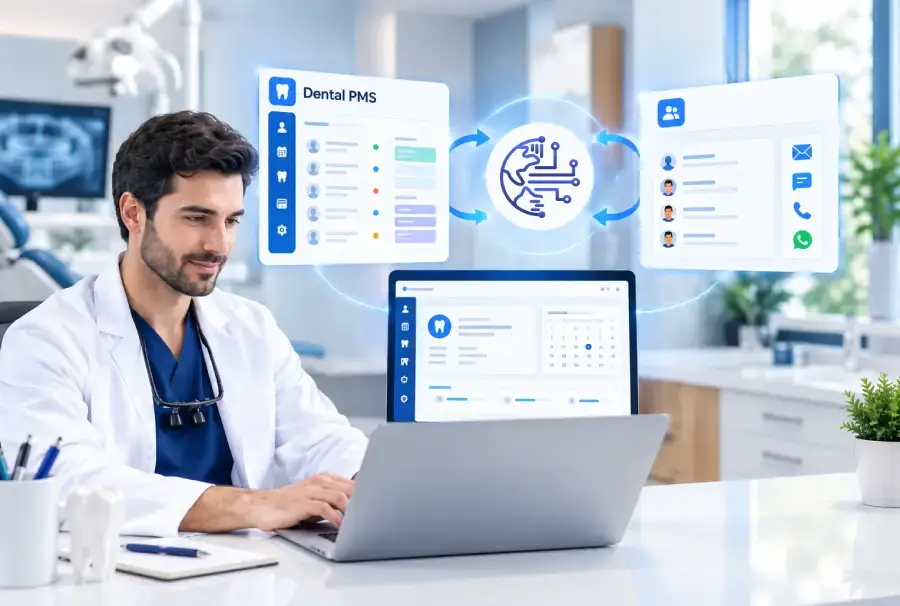
SmartSync was engineered to eliminate the manual spreadsheet gap between clinical practice management systems and modern CRM marketing platforms.
Dental operations depend on accurate PMS records, while marketing and communication teams work inside the CRM. When these databases remain siloed, human staff become a slow, error-prone manual bridge.
Contact details and medical histories updated at the front desk fail to reach CRM records, resulting in misdirected messages.
Rescheduled or cancelled appointments take hours to appear in CRM calendars, triggering inaccurate reminder sequences.
Marketing teams rely on periodic CSV exports, creating high administrative overhead and security risks.
Clinics cannot tie lead campaigns to actual dental chair production, completed treatments, or collected payments.
Each dental software provider uses bespoke database schemas, making custom API integrations prohibitively expensive.
Dental service organizations (DSOs) and agencies struggle to maintain consistent marketing across locations running different PMS versions.
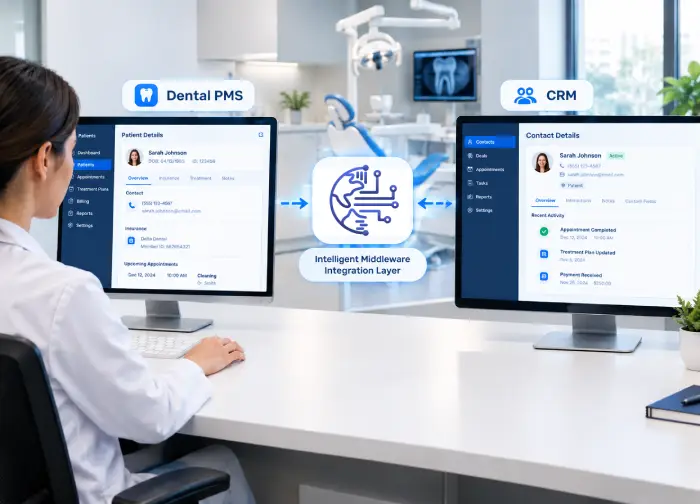
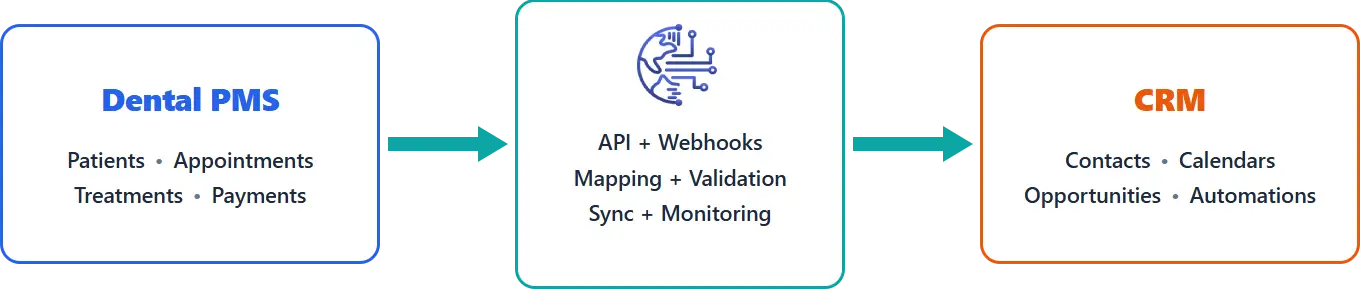
SmartSync acts as an intelligent middleware engine between supported dental PMS platforms and CRM systems, continuously streaming operational events and mapping schemas seamlessly.
Continuous creation and updating of patient demographics, insurance info, contact methods, and unique identifiers.
Real-time booking, provider scheduling, chair allocation, status changes (booked, arrived, completed, no-show).
Proposed treatment plans, accepted procedures, ADA code tracking, and completed hygiene or surgical milestones.
Financial ledger events, copay collections, insurance adjustments, and total practice revenue attribution.
Dentist, hygienist, and operatory room attribution, matching appointments to the correct clinical schedule.
Configurable data mapping tailored to unique practice requirements, tags, intake questions, and custom CRM properties.
The value of SmartSync is not simply moving records from one database to another. The integration turns operational activity into usable CRM events.
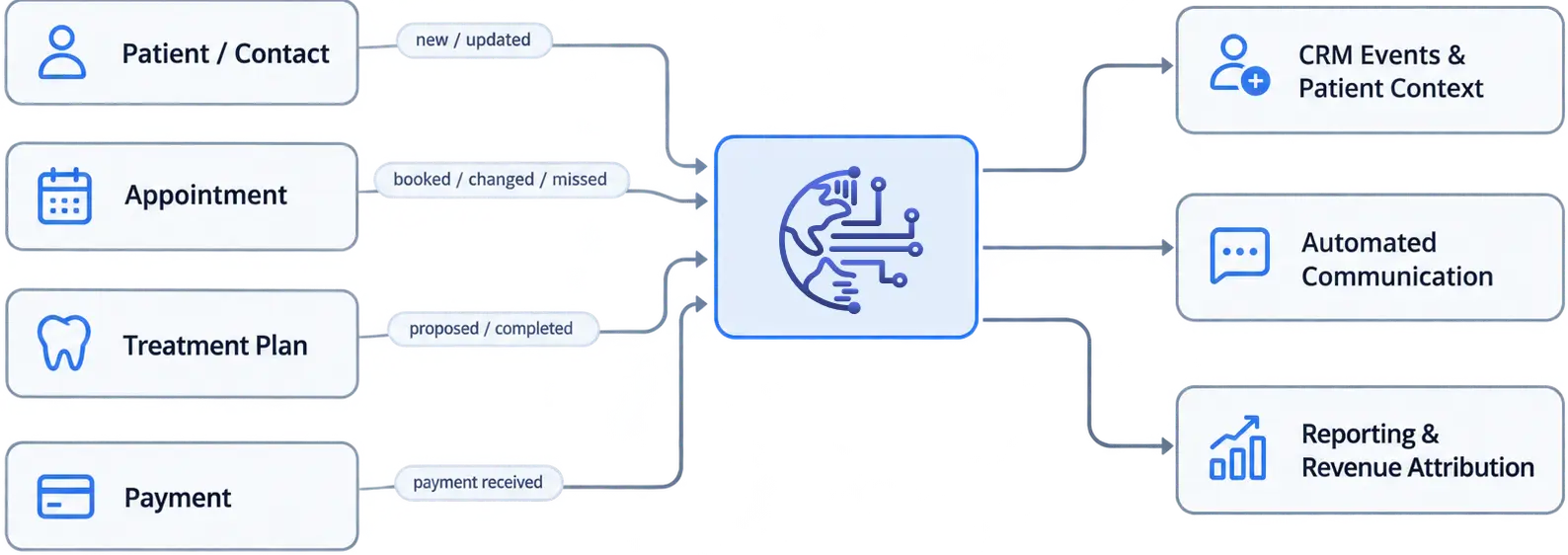
SmartSync positions synchronized events as inputs for patient communication automation, reporting dashboards and revenue attribution.
SmartSync's onboarding materials describe a 45-minute setup consultation and a typical path to go-live within about three business days.
A patient enters the dental practice's PMS. SmartSync synchronizes the relevant patient information into the CRM, where the agency or practice can apply tags, workflows and communication sequences.
Front-desk staff create the patient chart in the PMS (e.g. Open Dental, Dentrix), capturing demographics, insurance, and contact details.
SmartSync normalizes the payload, validates required fields, prevents duplicates, and creates or updates the CRM contact record.
The CRM immediately fires welcome SMS sequences, sends digital medical history links, and routes acquisition attribution tags.
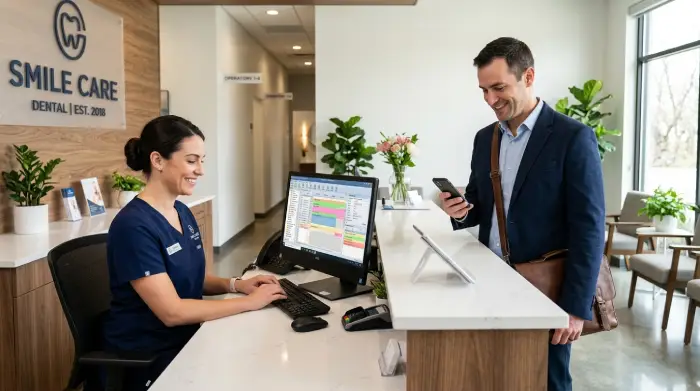
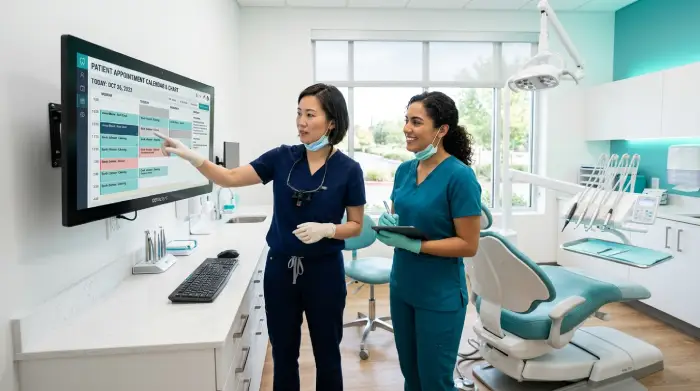
An appointment is booked, changed, cancelled or otherwise updated. SmartSync keeps the CRM appointment context aligned so reminders, confirmations, rescheduling and reporting can be based on current practice activity.
Appointments booked online, via AI voice agents, or rescheduled directly in the clinical operatory are captured immediately.
SmartSync propagates changes between the PMS operatory chair schedule and CRM calendars within minutes, preventing double bookings.
Cancelled or missed appointments automatically trigger recovery text workflows, while completed visits initiate post-op review requests.
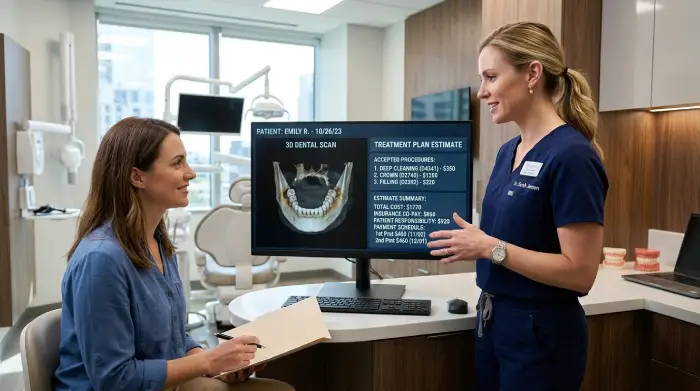
Treatment and payment activity can be synchronized into the CRM environment. This gives agencies and practice stakeholders a stronger connection between patient acquisition, treatment activity and revenue-related outcomes.
Proposed dental treatments, accepted restorative plans, and completed procedures are synchronized directly from the PMS.
Ledger payments, insurance copays, and patient financial balances update the CRM opportunity stage and customer lifetime value.
Connects ad campaigns directly to high-margin procedure production (implants, aligners, crowns), proving verified revenue return.
For agencies and multi-location organizations, the integration layer provides a common CRM destination while the underlying clinics may use different PMS products.
Seamlessly integrates multiple clinic locations operating on different systems, including Dentrix, Open Dental, Eaglesoft, and Curve Dental.
SmartSync maps each clinic's distinct database structure into a unified, normalized CRM data model across all sub-accounts.
DSO executives and marketing teams track cross-location production, appointment conversion, and marketing ROI from a central dashboard.
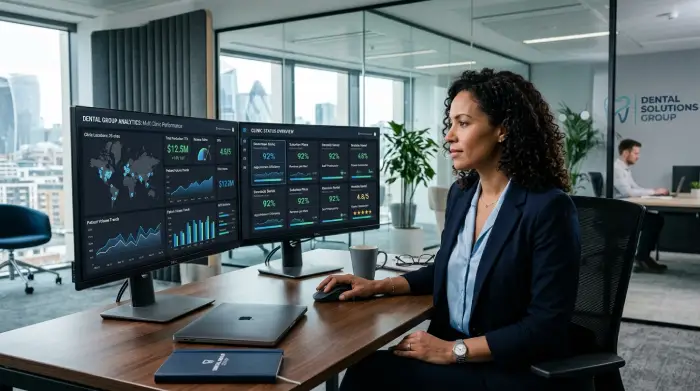
A production integration must be evaluated beyond the successful path. SmartSync's architecture and operating model require validation across different PMS schemas, field mappings, appointment states and synchronization directions.
| Event Description | Data Direction | Sync Status |
|---|---|---|
| Patient updated | PMS → CRM | Completed |
| Appointment changed | PMS → CRM | Completed |
| New appointment | CRM → PMS | Completed |
| Payment received | PMS → CRM | Completed |
| Field mapping review | PMS → CRM | Review |
In simple terms: SmartSync keeps the data current; the CRM turns current data into actions. This separation makes the overall workflow easier to scale and maintain.
These features and their operational behavior are documented in the original project material.
Propagates supported changes between PMS and CRM.
Keeps CRM patient/contact information aligned with PMS activity.
Keeps appointment activity and scheduling context current.
Makes treatment activity available for CRM workflows and reporting.
Connects payment activity to CRM-side reporting and attribution.
Maps PMS fields into CRM fields based on practice requirements.
Connects multiple dental/orthodontic PMS products to supported CRMs.
Provides operational visibility into synchronized patient, treatment, appointment and revenue-related data.
Uses real practice activity as triggers for communication and campaigns.
Manual Entry/Export
Automated Synchronization
Manual Reconciliation
Near-real-time Synchronization
Based on stale/manual lists
Based on current practice events
Separate PMS review
CRM workflow can use synced activity
Manual consolidation
PMS activity available in CRM/reporting layer
Separate PMS reports
Centralized CRM view
Repeated human effort
Automated recurring synchronization
SmartSync's public materials describe typical synchronization as occurring within minutes and emphasize replacing manual exports with automated updates.
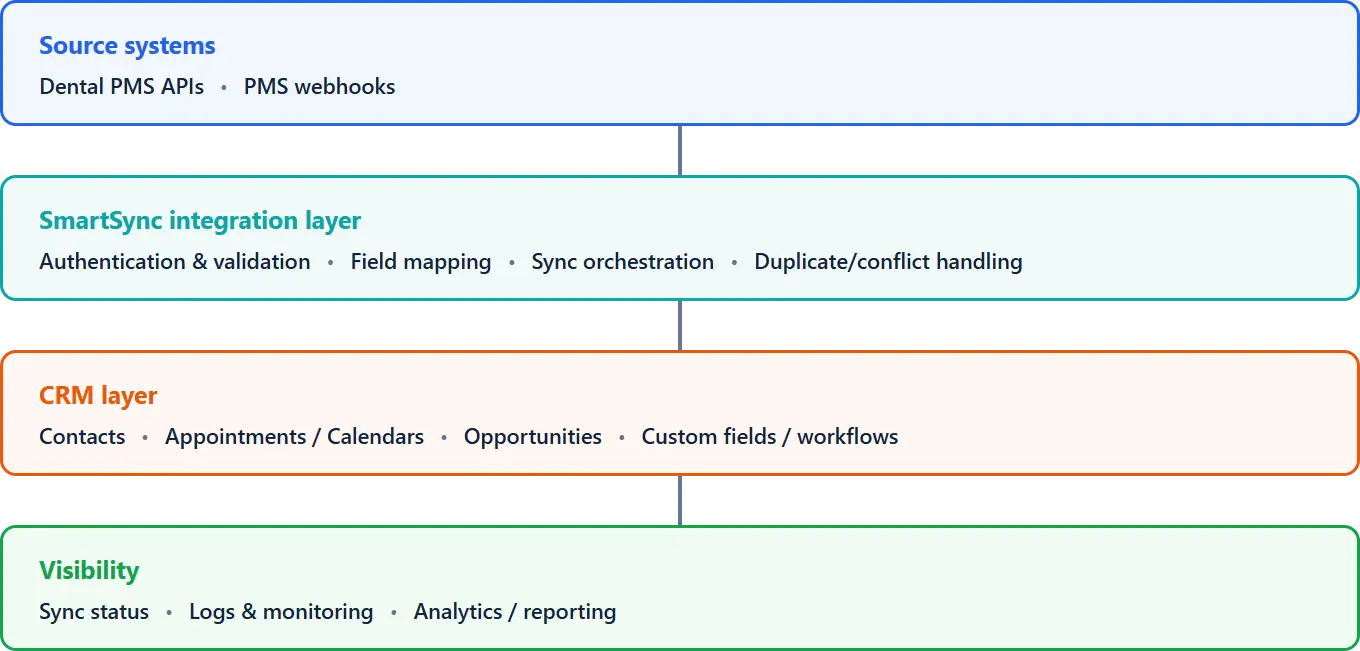
Provide supported patient, appointment, treatment and payment events through available APIs/connectors/webhooks.
Authenticates, validates, maps, processes and routes synchronization events.
Writes synchronized data into contacts, appointments, opportunities and custom fields.
Provides visibility into sync activity, status and operational performance.
Dental practices do not use a single PMS. SmartSync's platform approach is designed to absorb those differences and present a consistent CRM-facing data model.
Core PMS platforms publicly listed include Open Dental, Dentrix, Dentrix Ascend, Dentrix Enterprise, Eaglesoft, Curve Dental, Denticon, eClinicalWorks, Dolphin, OrthoTrac and PracticeWorks.
Supported CRM platforms publicly listed include GoHighLevel, HubSpot and Salesforce.







Our sales manager reaches out to you within a few days after analyzing your business requirements.
Meanwhile, we sign an NDA to ensure the highest level of privacy.
Our pre-sale manager presents project estimates and an approximate timeline.


 AI Consulting Services
 RAG Development
 LLM Development
 AI App Development
 AI Software Development
 AI Integration Services
 AI Agent Development
 AI Chatbot Development
 LLM Fine-Tuning
 Generative AI Integration
 AI Copilot Development
 Data Analytics
 Data Warehousing
 Data Annotation
 AIOps
AIOps
 DevOps Consulting
 DevOps Automation
 SRE
SRE
 LLM Observability
 AI for Healthcare
 AI for CRM
 AI for Customer Support
 AI for Manufacturing
 AI for Real Estate
 AI for Education
 AI for Finance
 AI for E-Commerce
 AI/ML Consulting
 Object Detection
 ChatBot Development
 Computer Vision
 Natural Language Processing
 Data and Ai
 Mobile Apps Development
 Chrome Extension Development
 Odoo Development Services
 Odoo Implementation Services
 Odoo Customization Services
 Odoo Integration Services
 Odoo Migration & Upgrade Services
 Odoo ERP Consulting Services
 Odoo Support and Maintenance Services
 Odoo AI & Automation Services
 Salesforce Consulting
 Salesforce Product
 Salesforce Case Study
 SuiteCRM Consulting
 SuiteCRM Addons
 Devops
 AWS Consulting
 Digital Ocean Consulting
 OnPrem. Server Support
 Cloud Migration Services
 Salesforce WhatsApp Business API
 Salesforce WhatsApp Web Integration
 Salesforce Telephony Integration
 Dentrix To GHL
 Outlook Integration
 MindBody Integration
 Zillow Integration
 Open Dental To GHL
 Number Plate Recognition
 Taxi App & Mobility
 Smart Bus & Fleet System
 HR Solutions (Salesforce)
 Quick HRMS (SuiteCRM)
 CRM For Telecom Industry
 CRM For Travel
 CRM For Call Center
 CRM For Education
 CRM For Healthcare
 CRM For Clinics
 CRM For Locksmith
 CRM For Law
 NodeJS
 Python
 .NET
.NET
 Classic ASP
 Core PHP
 ReactJS
 AngularJs
 Android
 iOS
iOS
 Flutter
 React Native
 AR/VR
AR/VR
 CodeIgniter
 Laravel
 Hire .NET Core Developer
 Hire Salesforce Developer
 Hire Odoo Developers
 CRM For Legal Practice
 Online Photo Booking System
 Task Scheduler for Construction Industry
 Patient Management Software
 Dentist Management System
 Food Delivery App
 CRM For Aviation Company
 Salesforce Marketing Cloud for Online Retail Store
 Salesforce Implementation & Customization For RFID Supplier
 Ecommerce System Integration With ERP
 CRM For Real Estate Company
 Find Nearby Salon
 Taxi Booking App
 CRM For Travel Agency
 Case Management Software
 Engineering Company Website
 CRM For Telecom Industry
 Company Profile
 SuiteCRM Profile
 Telco CRM white paper
 AI enabled speech analysis