Pioneer in Offering CRM Solutions since 2010...
Pioneer in Offering CRM Solutions since 2010...
 ChatGPT Development
 Claude AI Development
 Gemini AI Development
 Microsoft Copilot Development
 DeepSeek AI Development
 LangChain Development
 CrewAI Development
 AutoGen Development
 LangGraph Development
 Pinecone Development
 Weaviate Development
 AI Workflow Automation
 Qdrant Development
 Cursor AI Consulting
 GitHub Copilot Consulting
 Enterprise AI Search
ChatGPT Development
Claude AI Development
Gemini AI Development
Microsoft Copilot Development
DeepSeek AI Development
LangChain Development
CrewAI Development
AutoGen Development
LangGraph Development
Pinecone Development
Weaviate Development
AI Workflow Automation
Qdrant Development
Cursor AI Consulting
GitHub Copilot Consulting
Enterprise AI Search
Enterprise AI Search
ChatGPT Development
Claude AI Development
Gemini AI Development
Microsoft Copilot Development
DeepSeek AI Development
LangChain Development
CrewAI Development
AutoGen Development
LangGraph Development
Pinecone Development
Weaviate Development
AI Workflow Automation
Qdrant Development
Cursor AI Consulting
GitHub Copilot Consulting
Enterprise AI Search
How AI-powered record summarization transforms detailed CRM information into concise insights, identifies risks and opportunities, and recommends actionable next steps
Sales representatives, support teams and managers may need to review this information manually before they can understand the current situation or determine the appropriate next action.
AI Record Summary introduces an AI-powered summarization capability directly into the CRM record.
The solution analyzes configured CRM information and converts it into a concise, easy-to-understand summary.
Beyond basic summarization, users can also ask the AI to make the summary shorter, expand it with additional context, refresh the summary, identify risks and opportunities, and suggest next steps.
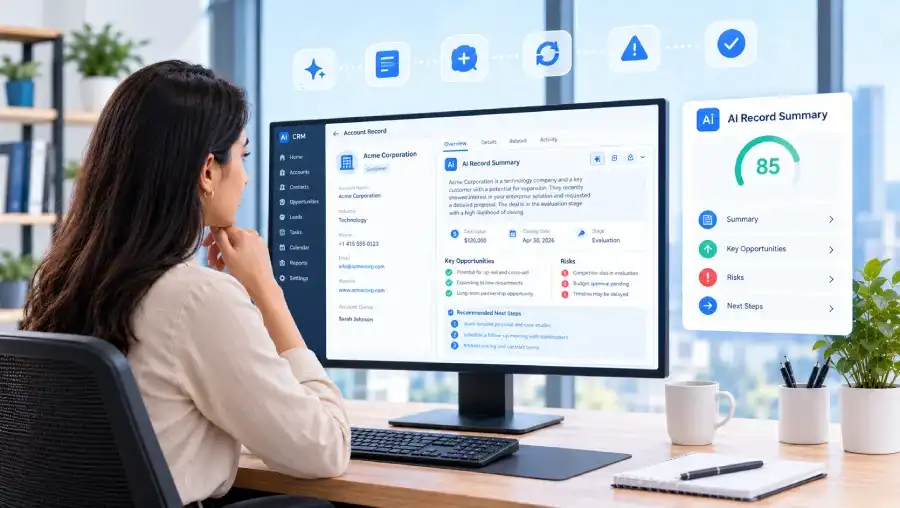
This transforms the traditional CRM review process from manually reading large amounts of information into an AI-assisted workflow:
CRM Record → AI Summary → Insights → Recommended Actions
CRM records often contain a large amount of information spread across multiple fields.
Traditional Process
Customer information, opportunity details, sales stage, amount, contact information, business requirements, notes, and other configured CRM fields are spread across multiple fields.
Sales representatives and managers need to review multiple fields and notes before understanding the current situation.
Reviewing records becomes particularly challenging when users manage a large number of CRM records or regularly review large sales pipelines.
The main QA challenge was validating an AI-powered feature whose output depends on CRM record data, administrator configuration, and an external AI service. Testing therefore covered the complete user journey rather than AI generation in isolation.
Automation supports repeatable regression testing of critical workflows, including CRM navigation, configuration, record selection, summary generation, popup validation, and each documented summary action.
ZIP installation and module availability
License, AI setup, module and field settings, save/persistence behavior
Button visibility, popup, controls, layout, loading state
Gemini-based summary generation and response handling
Correct record-specific context and behavior with complete or limited data
Shorten, expand, risks/opportunities, next-step suggestions, refresh, and copy
Missing configuration, unavailable AI service, failed API responses, empty or unexpected output
Existing CRM workflows and feature impact
Documented support for vTiger 7.x and 8.x and above
AI Record Summary introduces an AI-powered summary directly into the CRM record.

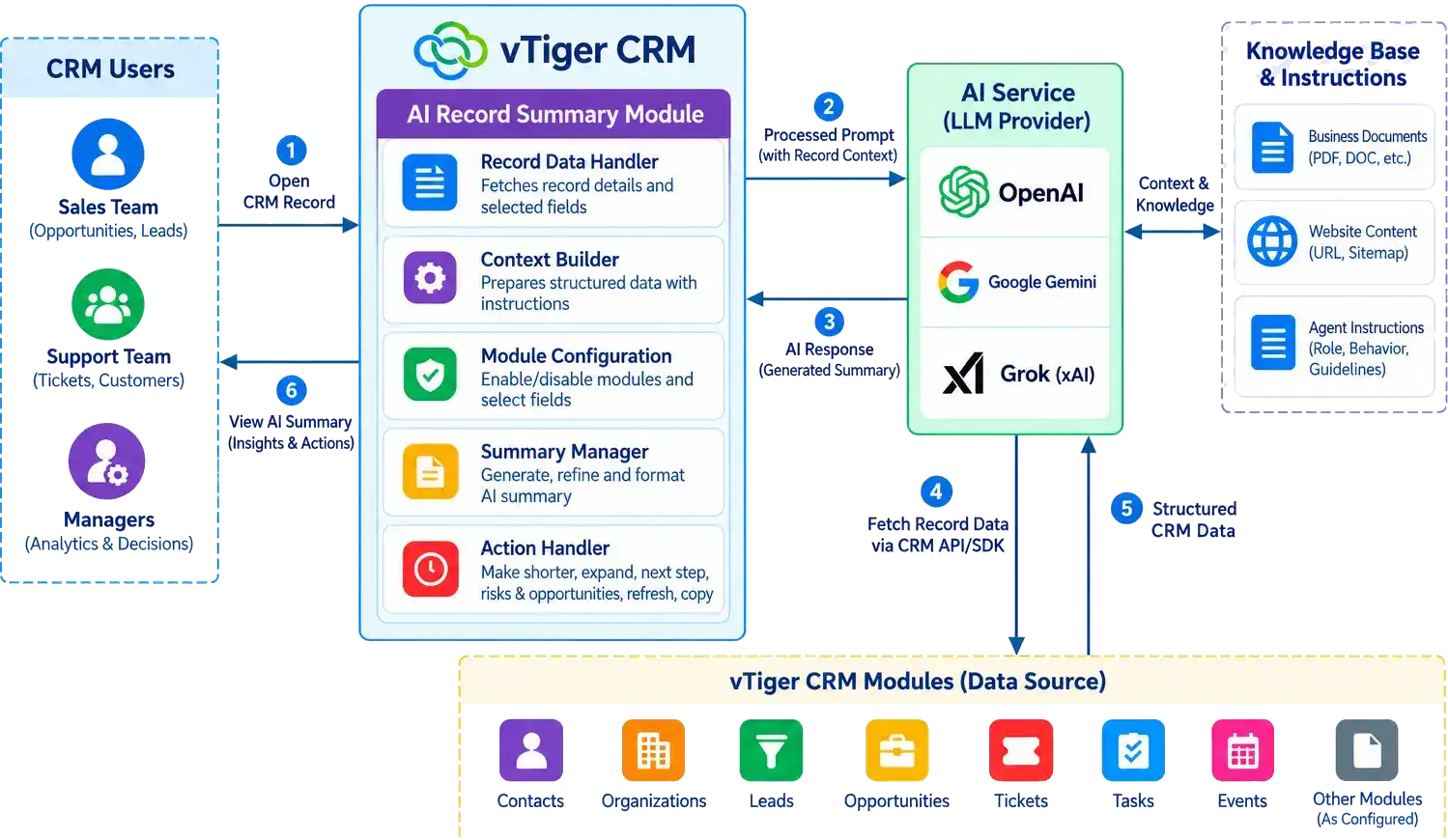
Administrators can configure the CRM module, relevant CRM fields, and AI functionality to determine which record information is used to generate AI-powered summaries.
When users open a supported CRM record, an AI Record Summary option becomes available. Users can generate a concise summary of the configured CRM data without manually reviewing every field.
The AI analyzes the configured CRM data to produce a summary and surface relevant insights, helping sales representatives and managers understand the current situation and identify potential next steps while remaining inside the CRM.
The objective was not to replace the user's understanding of the customer or business situation.
The objective was to reduce the time required to consume CRM information.
AI acts as an intelligent assistant that converts detailed CRM data into a concise overview and highlights information that may require attention.
Users can then move from understanding the record to taking action more quickly.
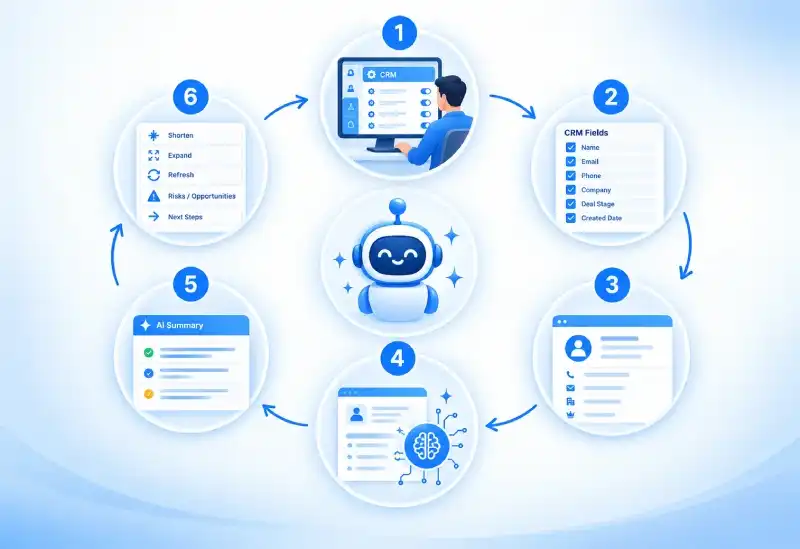
An administrator selects the CRM module where AI Record Summary should be enabled.
The administrator selects the CRM fields that should be used when generating the summary.
This allows the organization to control which information is provided to the AI.
The user opens a supported CRM record.
The user selects AI Record Summary.
The configured CRM information is processed by the AI service.
The AI-generated summary is displayed in a dedicated CRM interface.
The user can quickly review important information without manually reading every configured field.
The user can continue working with the generated summary by requesting additional actions such as: Make shorter, Expand, Refresh, Highlight risks and opportunities, and Suggest next steps.
AI Record Summary extends beyond simple summarization.
| AI Capability | Purpose |
|---|---|
| Record Summary | Converts detailed CRM information into a concise overview. |
| Make Shorter | Produces a more concise version for quick review. |
| Expand | Provides additional details and context. |
| Refresh | Regenerates the summary when CRM information changes. |
| Risks & Opportunities | Identifies important business factors that may require attention. |
| Next-Step Suggestions | Converts CRM information into actionable recommendations. |
| Copy Summary | Allows users to reuse the generated summary in other CRM activities. |
This creates a workflow where AI helps users both understand information and determine what to do next.
A salesperson manages a large pipeline containing hundreds of opportunities. Each opportunity may contain customer information, sales stage, opportunity value, notes, business requirements, expected closing date, and other CRM information.
The salesperson opens the opportunity and manually reviews the available information.
The salesperson selects AI Record Summary. The AI generates a concise summary containing the important information.
The salesperson can then use additional actions such as Shorter → Risks & Opportunities → Next Steps.

A CRM record may contain customer details, opportunity information, deal value, sales stage, requirements, expected closing date, and the latest notes.
A CRM record may contain: Customer: ABC Corporation, Opportunity: CRM Implementation, Value: $50,000, Stage: Negotiation, Customer requirement: Multi-user CRM, Expected closing: This month, Latest note: Customer requested pricing revision
ABC Corporation is currently in the negotiation stage for a $50,000 CRM implementation. The customer has requested a pricing revision and is targeting completion this month.
The user can then ask the AI to identify risks, opportunities or recommended next actions.

The Highlight Risks & Opportunities capability allows users to focus specifically on important business factors.
Pricing is still under discussion, Closing date is approaching, Customer requirements are not fully confirmed.
Customer has an active implementation requirement, Deal value is significant, Customer is already in the negotiation stage.
Deal value is significant.
This provides a more focused view than a general record summary.
Instead of simply understanding what is contained in the record, users can identify the factors that may influence the outcome.

The Next Step Suggestion capability converts the record summary into actionable recommendations.
1. Follow up with the customer regarding the revised pricing.
2. Confirm the final implementation requirements.
3. Schedule a negotiation call.
4. Confirm the expected closing date.
This helps users move from understanding the record to taking action.
The AI therefore becomes a decision-support assistant rather than simply a summarization tool.

Different CRM modules require different information. AI Record Summary allows administrators to select the fields that are relevant to each business process.
Relevant fields may include: Lead source, Industry, Company, Requirements, Contact information
Relevant fields may include: Amount, Sales stage, Closing date, Customer requirements, Sales notes
Relevant fields may include: Issue, Priority, Status, Customer information, Resolution details
The configurable field approach allows AI summaries to be adapted to different CRM modules and business processes.

Users can understand CRM records without manually reviewing every field.
Important information is presented in a concise format.
Sales and support teams spend less time reading and interpreting CRM information.
AI provides a standardized approach to summarizing CRM records.
Sales users can quickly identify risks, opportunities and potential deal drivers.
The solution does not stop at summarization. It can also provide suggested next steps.
AI assistance is available directly inside the CRM record.
Read multiple fields and notes individually.
Review a concise AI-generated overview.
Manually interpret information to identify concerns.
Request a focused view of risks and opportunities.
Work out follow-up actions from scratch.
Use suggested next steps as an additional input.
Repeat record review when a different level of detail is needed.
Shorten or expand the summary as needed.
Test the feature's behavior manually for each regression cycle.
Use automation for repeatable validation of key workflows.
AI Record Summary combines existing CRM information with AI-powered analysis.
AI Record Summary provides a foundation for additional AI-powered CRM capabilities.
The AI could include relevant information from related CRM records.
For example: Account → Contacts → Opportunities → Tickets → Activities
Users could compare multiple opportunities, accounts or leads using AI.
For example: Opportunity A vs. Opportunity B → AI Comparison → Strengths, Risks and Differences
AI-generated insights could be used within CRM workflows.
For example: If a record contains a high-risk situation → Notify the sales manager
Summaries could automatically refresh when important CRM information changes.
Management-level summaries could be generated containing only the most important information.
The AI could provide recommendations based on CRM history and current record information.
AI-generated insights and trends could be displayed on CRM dashboards for management reporting and decision support.
AI Record Summary is designed as an AI assistant rather than an autonomous decision-maker.
The user remains responsible for:







Our sales manager reaches out to you within a few days after analyzing your business requirements.
Meanwhile, we sign an NDA to ensure the highest level of privacy.
Our pre-sale manager presents project estimates and an approximate timeline.


 AI Consulting Services
 RAG Development
 LLM Development
 AI App Development
 AI Software Development
 AI Integration Services
 AI Agent Development
 AI Chatbot Development
 LLM Fine-Tuning
 Generative AI Integration
 AI Copilot Development
 Data Analytics
 Data Warehousing
 Data Annotation
 AIOps
AIOps
 DevOps Consulting
 DevOps Automation
 SRE
SRE
 LLM Observability
 AI for Healthcare
 AI for CRM
 AI for Customer Support
 AI for Manufacturing
 AI for Real Estate
 AI for Education
 AI for Finance
 AI for E-Commerce
 AI/ML Consulting
 Object Detection
 ChatBot Development
 Computer Vision
 Natural Language Processing
 Data and Ai
 Mobile Apps Development
 Chrome Extension Development
 Odoo Development Services
 Odoo Implementation Services
 Odoo Customization Services
 Odoo Integration Services
 Odoo Migration & Upgrade Services
 Odoo ERP Consulting Services
 Odoo Support and Maintenance Services
 Odoo AI & Automation Services
 Salesforce Consulting
 Salesforce Product
 Salesforce Case Study
 SuiteCRM Consulting
 SuiteCRM Addons
 Devops
 AWS Consulting
 Digital Ocean Consulting
 OnPrem. Server Support
 Cloud Migration Services
 Salesforce WhatsApp Business API
 Salesforce WhatsApp Web Integration
 Salesforce Telephony Integration
 Dentrix To GHL
 Outlook Integration
 MindBody Integration
 Zillow Integration
 Open Dental To GHL
 Number Plate Recognition
 Taxi App & Mobility
 Smart Bus & Fleet System
 HR Solutions (Salesforce)
 Quick HRMS (SuiteCRM)
 CRM For Telecom Industry
 CRM For Travel
 CRM For Call Center
 CRM For Education
 CRM For Healthcare
 CRM For Clinics
 CRM For Locksmith
 CRM For Law
 NodeJS
 Python
 .NET
.NET
 Classic ASP
 Core PHP
 ReactJS
 AngularJs
 Android
 iOS
iOS
 Flutter
 React Native
 AR/VR
AR/VR
 CodeIgniter
 Laravel
 Hire .NET Core Developer
 Hire Salesforce Developer
 Hire Odoo Developers
 CRM For Legal Practice
 Online Photo Booking System
 Task Scheduler for Construction Industry
 Patient Management Software
 Dentist Management System
 Food Delivery App
 CRM For Aviation Company
 Salesforce Marketing Cloud for Online Retail Store
 Salesforce Implementation & Customization For RFID Supplier
 Ecommerce System Integration With ERP
 CRM For Real Estate Company
 Find Nearby Salon
 Taxi Booking App
 CRM For Travel Agency
 Case Management Software
 Engineering Company Website
 CRM For Telecom Industry
 Company Profile
 SuiteCRM Profile
 Telco CRM white paper
 AI enabled speech analysis