Pioneer in Offering CRM Solutions since 2010...
Pioneer in Offering CRM Solutions since 2010...
 ChatGPT Development
 Claude AI Development
 Gemini AI Development
 Microsoft Copilot Development
 DeepSeek AI Development
 LangChain Development
 CrewAI Development
 AutoGen Development
 LangGraph Development
 Pinecone Development
 Weaviate Development
 AI Workflow Automation
 Qdrant Development
 Cursor AI Consulting
 GitHub Copilot Consulting
 Enterprise AI Search
ChatGPT Development
Claude AI Development
Gemini AI Development
Microsoft Copilot Development
DeepSeek AI Development
LangChain Development
CrewAI Development
AutoGen Development
LangGraph Development
Pinecone Development
Weaviate Development
AI Workflow Automation
Qdrant Development
Cursor AI Consulting
GitHub Copilot Consulting
Enterprise AI Search
Enterprise AI Search
ChatGPT Development
Claude AI Development
Gemini AI Development
Microsoft Copilot Development
DeepSeek AI Development
LangChain Development
CrewAI Development
AutoGen Development
LangGraph Development
Pinecone Development
Weaviate Development
AI Workflow Automation
Qdrant Development
Cursor AI Consulting
GitHub Copilot Consulting
Enterprise AI Search
How AI-powered writing assistance was integrated directly into the CRM to reduce repetitive writing, improve communication quality and accelerate sales and support workflows
Sales, support and customer service teams spend a significant amount of time creating and improving written communication. Emails, follow-ups, support responses, internal notes and customer updates often require repeated drafting, rewriting and proofreading.
CTAIWriter introduces AI-powered writing assistance directly into the CRM, allowing users to generate, rewrite, improve, summarize and personalize content without leaving the CRM environment.
Instead of moving between the CRM and external AI applications, users can provide a simple instruction or existing content and receive an AI-generated response directly within their existing workflow.

The solution is designed to reduce repetitive writing effort while allowing users to review and control the final content before it is used.
CRM users regularly need to create customer-facing and internal content as part of their daily work. Creating this content manually consumes significant time, particularly when users need to ensure that communication is professional, grammatically correct, clear and appropriate for each client.
Sales and support staff spend hours every day typing similar email follow-ups, meeting recaps, and support responses from a completely blank screen.
Moving between CRM and browser-based AI chatbots creates constant friction: copying customer information back and forth breaks concentration and slows turnaround.
Different team members write with varying degrees of clarity, grammar, and tone. Maintaining consistent brand polish across all customer communications requires tedious proofreading.
When support agents take 10 to 15 minutes to carefully draft complex responses, customer waiting times increase and satisfaction drops during peak inquiry spikes.
Copying raw customer data into uncontrolled consumer AI platforms exposes sensitive CRM details without organizational audit trails, API encryption, or centralized access controls.
External AI assistants do not know the lead name, opportunity status, recent notes, or account history, requiring users to manually describe the context every single time.
The QA challenge was to validate AI-generated content across different CRM modules and content areas, together with configuration, response display, refinement actions, and insertion into existing workflows. Testing covered the user journey from extension installation through generation and final use.
Automation was introduced for important and repetitive regression scenarios. The QA case study documents Playwright, TypeScript, and Page Object Model (POM) as the framework approach.
CRM login and access to relevant modules
License/AI configuration, module selection, content-area settings
AI Assistant visibility and opening in supported workflows
Prompt entry, submission, and generated response display
Improve It, Make It Shorter, Add Suggestion
Use it and validation that content is inserted into the correct field
Drafting/reply workflows and content insertion
Create/edit forms, generation, refinement, and insertion
Invalid settings, generation failures, and existing CRM workflows
CTAIWriter was developed as an AI-powered writing assistant integrated directly into the CRM.

Use AI writing assistance directly within CRM records and text fields, allowing users to create or improve content while working in their existing CRM workflows without switching between applications.
Generate new content by providing simple instructions or improve existing text with AI assistance. Users can adapt the content to their specific needs, communication goals, and business requirements.
Review the AI-generated content, make any necessary changes, and refine the final output before using it in CRM records, customer responses, sales follow-ups, or other business communications.
The objective was not to replace sales or support personnel with automated bots. The goal was to remove repetitive drafting toil, eliminate friction, and empower representatives to produce polished, high-impact communication in a fraction of the time.
Users enter bullet points or a single-sentence prompt; CTAIWriter expands it into a fully formed, grammatically sound business message ready for dispatch.
Rough thoughts, fragmented sentences, and quick bullet points are effortlessly transformed into professional, courteous client communication.
Eliminates awkward phrasing, typos, and grammatical errors instantly, giving team members confidence when communicating with enterprise decision-makers.
Easily toggle between friendly, formal, concise, or persuasive tones depending on whether the recipient is a new lead, executive sponsor, or angry support caller.
Condenses lengthy technical notes, client email chains, and support ticket histories into concise bulleted takeaways that save time across the team.
Every AI-generated sentence remains an editable suggestion. The user reviews, fine-tunes, and approves all text before it is stored in the database or sent out.
| Capability | Description & Operational Function |
|---|---|
| AI Content Generation | Creates complete, professional emails, notes, and messages from a simple one-line natural-language instruction. |
| Content Rewriting | Rewrites existing sentences or paragraphs to enhance flow, structure, and readability while strictly maintaining original meaning. |
| Grammar Correction | Identifies grammatical, spelling, and punctuation issues and provides clean, error-free phrasing automatically. |
| Professionalization | Converts casual or informal draft notes into formal, executive-ready communication suitable for high-value enterprise accounts. |
| Tone Adjustment | Allows users to dynamically adapt message tone between professional, friendly, formal, empathetic, or concise styles. |
| Summarization | Converts long, complex customer emails or technical diagnostic logs into clear, actionable, easy-to-digest summaries. |
| Custom Instructions | Empowers users to give specific prompt guidance (e.g., "Mention our 20% renewal discount" or "Include next Tuesday availability"). |
CTAIWriter makes AI-powered writing simple inside your CRM. Users can provide an instruction or existing content, generate a response with AI, review the result, and use it directly in their CRM workflow.
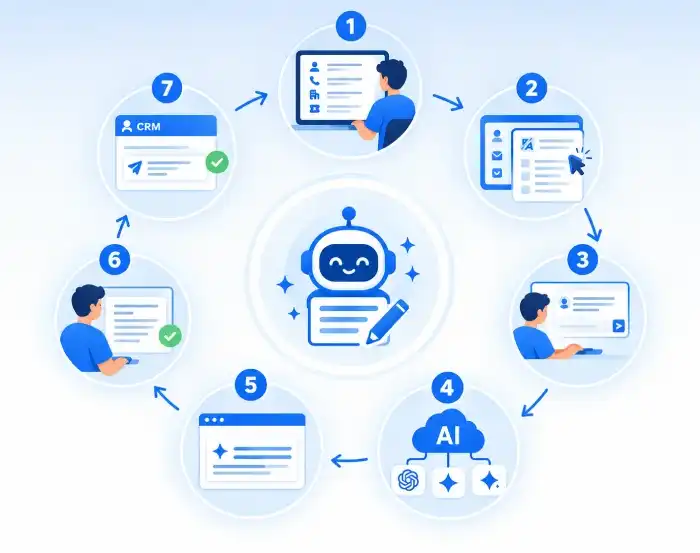
The user opens a lead, contact, account, ticket or another CRM record.
The user opens CTAIWriter from the relevant CRM interface or text field.
The user can enter existing content or describe what they want the AI to create.
The request is sent to the configured AI provider.
The AI generates the requested content.
The generated content is displayed to the user for review.
The user can use the generated response in the CRM communication or relevant field.
The agent can review the response and use it in the customer communication.
"My product is not working. Please check."
"Reply to the customer and tell them we are checking the issue."
"Thank you for reaching out. We are currently reviewing the issue with your product. Our team is investigating the problem and we will provide you with an update as soon as possible."

This reduces the time required to prepare routine sales communication.
After completing a product demonstration, a sales representative can provide:
“Create a professional follow-up email after today's product demo.”
Instead of starting from a blank message, CTAIWriter generates a structured follow-up that the salesperson can review and use.

A user may already have the required information but want to improve the quality of the message.
“We have checked your issue and our team will solve it soon.”
“Make this more professional.”
“We have reviewed your issue, and our team is currently working on a resolution. We will keep you updated and share further information as soon as possible.”

Streamline content generation, rewriting, grammar, tone adjustment, and summarization with AI-powered assistance for professional CRM communication.
Understand the user's requested task. Provide the correct requirement.
Create an initial response. Review the generated content.
Improve existing communication. Confirm that the original meaning is preserved.
Identify language issues. Validate the final wording.
Adjust communication style. Select the appropriate tone for the customer.
Reduce lengthy content. Confirm important information has not been lost.
Prepare usable CRM content. Approve and use the content.
CTAIWriter brings AI-powered writing assistance into existing CRM workflows, helping users create better content while working with relevant customer and business context.
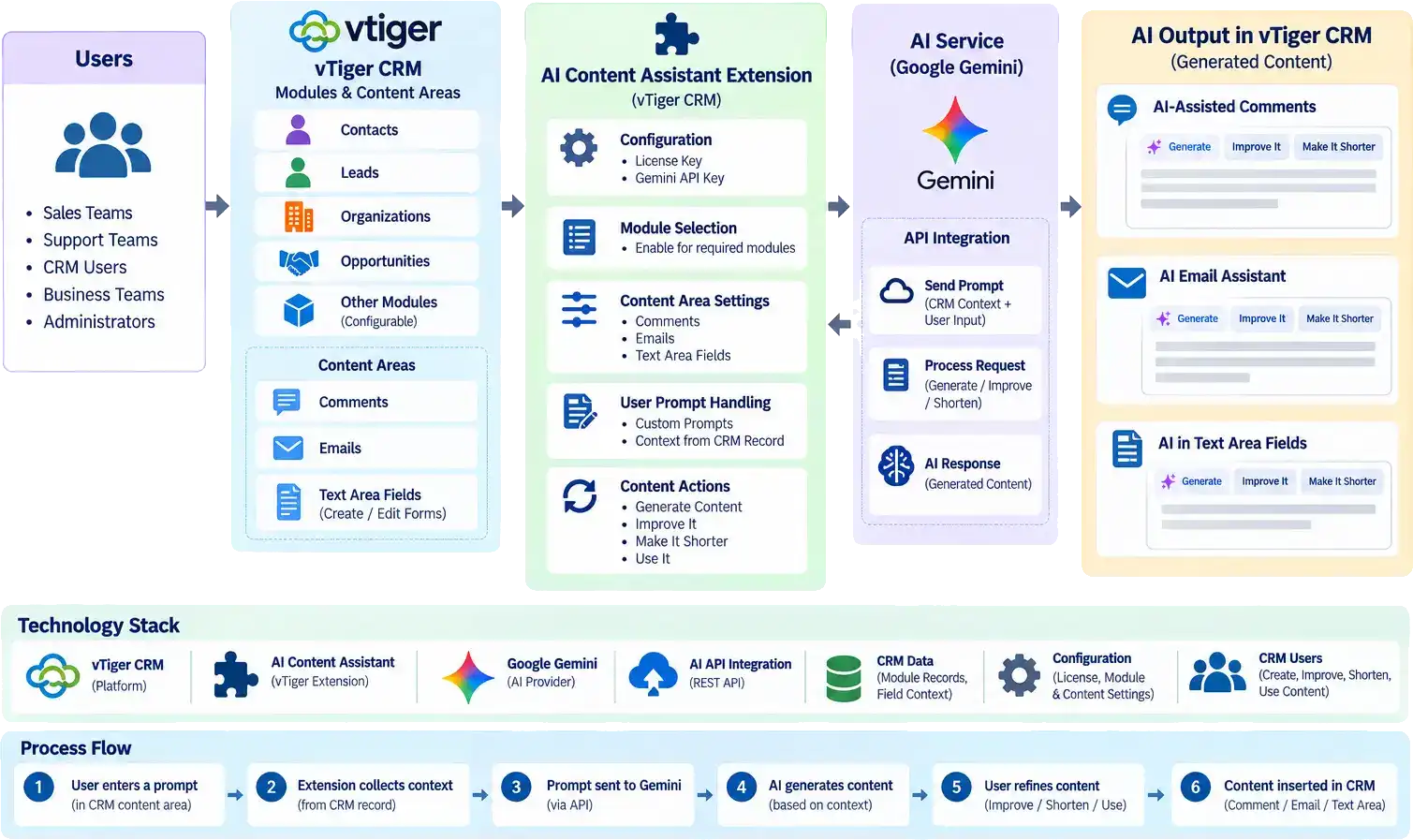
CTAIWriter can support multiple AI providers instead of depending on a single AI platform.






Users no longer need to manually start every message from a blank page or repeatedly copy content into external AI applications.
Start every message from scratch
Generates first drafts from simple instructions
Manually rewrite and proofread content
Quickly improves existing messages
Switch between CRM and external AI tools
Reduces manual proofreading effort
Spend more time preparing routine responses
Helps prepare professional responses faster
Manually draft follow-up messages after each interaction
Creates structured follow-up communication
Manually summarize lengthy information
Reduces lengthy content into concise information
Switch between the CRM and external AI tools to create or improve content.
Keeps AI assistance inside the CRM
Users can create high-quality communication faster without manually drafting every message.
Users can access AI assistance directly from the CRM instead of moving between multiple applications.
Sales and support teams can prepare responses more quickly.
AI assistance helps users create clearer, more professional and consistent communication.
Routine writing activities such as rewriting, proofreading, summarization and professionalization require less manual effort.
AI becomes part of the existing CRM workflow rather than requiring users to learn and manage another application.
The AI integration can be designed so that API credentials remain on the server side rather than being exposed directly to CRM users.
Organizations can implement controls such as:
Explore future enhancements that can make CRM communication more contextual, personalized, automated, and measurable with AI.
The AI can use CRM information such as:
Organizations can create reusable templates such as:
Users can generate summaries of CRM records and customer interactions.
The system can generate suggested responses based on incoming customer communication.
Administrators can monitor AI usage across users, teams, providers and time periods.
CTAIWriter is designed as an assistant rather than an autonomous communication system.
The user remains responsible for:







Our sales manager reaches out to you within a few days after analyzing your business requirements.
Meanwhile, we sign an NDA to ensure the highest level of privacy.
Our pre-sale manager presents project estimates and an approximate timeline.


 AI Consulting Services
 RAG Development
 LLM Development
 AI App Development
 AI Software Development
 AI Integration Services
 AI Agent Development
 AI Chatbot Development
 LLM Fine-Tuning
 Generative AI Integration
 AI Copilot Development
 Data Analytics
 Data Warehousing
 Data Annotation
 AIOps
AIOps
 DevOps Consulting
 DevOps Automation
 SRE
SRE
 LLM Observability
 AI for Healthcare
 AI for CRM
 AI for Customer Support
 AI for Manufacturing
 AI for Real Estate
 AI for Education
 AI for Finance
 AI for E-Commerce
 AI/ML Consulting
 Object Detection
 ChatBot Development
 Computer Vision
 Natural Language Processing
 Data and Ai
 Mobile Apps Development
 Chrome Extension Development
 Odoo Development Services
 Odoo Implementation Services
 Odoo Customization Services
 Odoo Integration Services
 Odoo Migration & Upgrade Services
 Odoo ERP Consulting Services
 Odoo Support and Maintenance Services
 Odoo AI & Automation Services
 Salesforce Consulting
 Salesforce Product
 Salesforce Case Study
 SuiteCRM Consulting
 SuiteCRM Addons
 Devops
 AWS Consulting
 Digital Ocean Consulting
 OnPrem. Server Support
 Cloud Migration Services
 Salesforce WhatsApp Business API
 Salesforce WhatsApp Web Integration
 Salesforce Telephony Integration
 Dentrix To GHL
 Outlook Integration
 MindBody Integration
 Zillow Integration
 Open Dental To GHL
 Number Plate Recognition
 Taxi App & Mobility
 Smart Bus & Fleet System
 HR Solutions (Salesforce)
 Quick HRMS (SuiteCRM)
 CRM For Telecom Industry
 CRM For Travel
 CRM For Call Center
 CRM For Education
 CRM For Healthcare
 CRM For Clinics
 CRM For Locksmith
 CRM For Law
 NodeJS
 Python
 .NET
.NET
 Classic ASP
 Core PHP
 ReactJS
 AngularJs
 Android
 iOS
iOS
 Flutter
 React Native
 AR/VR
AR/VR
 CodeIgniter
 Laravel
 Hire .NET Core Developer
 Hire Salesforce Developer
 Hire Odoo Developers
 CRM For Legal Practice
 Online Photo Booking System
 Task Scheduler for Construction Industry
 Patient Management Software
 Dentist Management System
 Food Delivery App
 CRM For Aviation Company
 Salesforce Marketing Cloud for Online Retail Store
 Salesforce Implementation & Customization For RFID Supplier
 Ecommerce System Integration With ERP
 CRM For Real Estate Company
 Find Nearby Salon
 Taxi Booking App
 CRM For Travel Agency
 Case Management Software
 Engineering Company Website
 CRM For Telecom Industry
 Company Profile
 SuiteCRM Profile
 Telco CRM white paper
 AI enabled speech analysis