Pioneer in Offering CRM Solutions since 2010...
Pioneer in Offering CRM Solutions since 2010...
 ChatGPT Development
 Claude AI Development
 Gemini AI Development
 Microsoft Copilot Development
 DeepSeek AI Development
 LangChain Development
 CrewAI Development
 AutoGen Development
 LangGraph Development
 Pinecone Development
 Weaviate Development
 AI Workflow Automation
 Qdrant Development
 Cursor AI Consulting
 GitHub Copilot Consulting
 Enterprise AI Search
ChatGPT Development
Claude AI Development
Gemini AI Development
Microsoft Copilot Development
DeepSeek AI Development
LangChain Development
CrewAI Development
AutoGen Development
LangGraph Development
Pinecone Development
Weaviate Development
AI Workflow Automation
Qdrant Development
Cursor AI Consulting
GitHub Copilot Consulting
Enterprise AI Search
Enterprise AI Search
ChatGPT Development
Claude AI Development
Gemini AI Development
Microsoft Copilot Development
DeepSeek AI Development
LangChain Development
CrewAI Development
AutoGen Development
LangGraph Development
Pinecone Development
Weaviate Development
AI Workflow Automation
Qdrant Development
Cursor AI Consulting
GitHub Copilot Consulting
Enterprise AI Search
How natural-language dashboards, an AI data analyst and real-time web research turned LeadMaster CRM data into instant answers.
LeadMaster runs its sales, customer and support operations on LeadMaster CRM. The CRM already held complete sales figures, product performance, customer records and support cases across many client companies, but getting answers out of that data was slow and depended on technical staff.
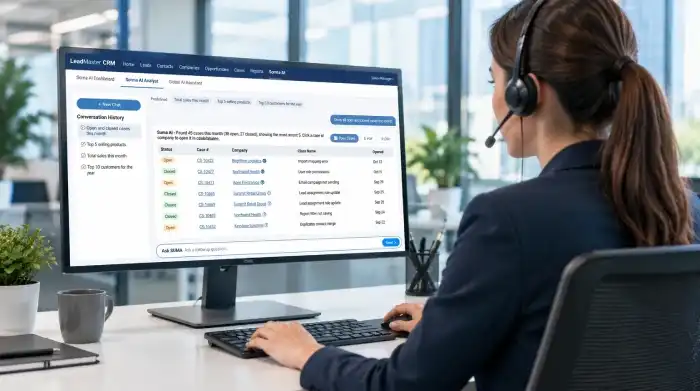
OCE delivered Suma AI, an AI assistant built directly into LeadMaster CRM. It has three modules—Suma AI Dashboard, Suma AI Analyst and the Global AI Assistant—which share one "Ask SUMA" input. Users ask questions in plain English and get back live charts, data tables linked to CRM records, company information and sourced web research.
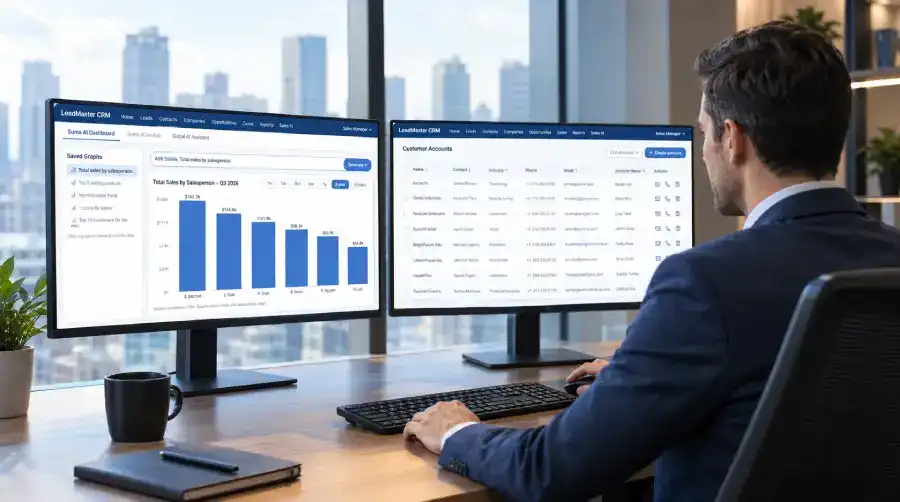
A direct shift from waiting on manual reporting queues to querying CRM data directly with natural language. In the sample measurement period, manual reporting effort fell by around 70% while managers unlocked on-demand operational intelligence.
LeadMaster's data was complete, but every question required a report, a query or a manual spreadsheet. Charts and dashboards were built by hand and rarely updated. Researching a customer company meant leaving the CRM and searching the web separately, and sharing results meant copying data into documents.
The new solution needed to:
Let any user ask business questions in plain English and get answers from live CRM data.
Remove the dependency on technical staff for routine reports and queries.
Generate charts and dashboards automatically, with the ability to customize and save them.
Keep dashboards current instead of relying on manually refreshed reports.
Link answers back to the underlying LeadMaster records for deeper detail.
Bring customer context (company background, contacts, leadership) inside the CRM.
Provide one place for both internal-data questions and general business questions.
Make results easy to share through PDF and CSV export.
Keep a history of past analysis so work is not lost or re-run from scratch.
Although the modules serve different operational needs, they share one Ask SUMA input, conversation history and New Chat, so users learn one way of working and use it everywhere inside LeadMaster CRM.
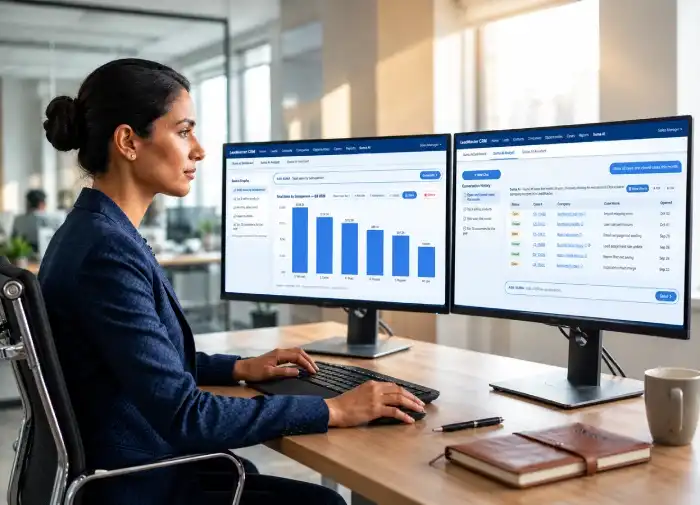
Turns a plain-English question into a live chart. Charts can be edited, saved, reloaded, deleted and reused—completely replacing manual, static dashboards with real-time operational views.
Answers questions against the CRM database as structured tables, featuring direct hyperlinks to LeadMaster records, PDF/CSV export, Company Info lookups, and one-click "Show Charts" generation.
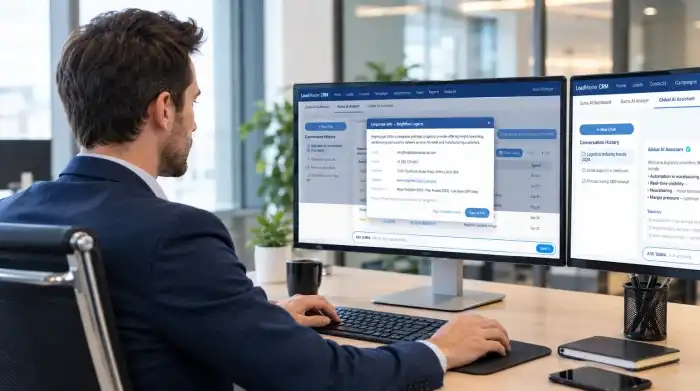
Answers general business and market questions using real-time web search, showing verifiable sources and giving account managers a one-click copy tool without ever leaving the CRM interface.
The objective was not to replace reporting staff or analysts. The objective was to remove the repetitive work that sat between a business question and its answer.
Most questions managers asked were predictable: monthly sales, top products, top customers, open versus closed cases. Each one still required a report request or a query. AI made it possible to translate a plain-English question into a query against live data, return the answer in seconds and present it as a table or chart that a non-technical user could act on.
Identified the questions users ask most often and turned them into predefined questions.
Connected Suma AI to the LeadMaster CRM SQL Server database so questions run on live data.
Built Dashboard (chart generation and saving), Analyst (tabular answers with history) and Global AI Assistant (web search with sources).
Added record links, PDF/CSV export and the Company Info lookup.
Validated AI answers against known reports and edge cases.
Released to users with predefined questions and guidance.
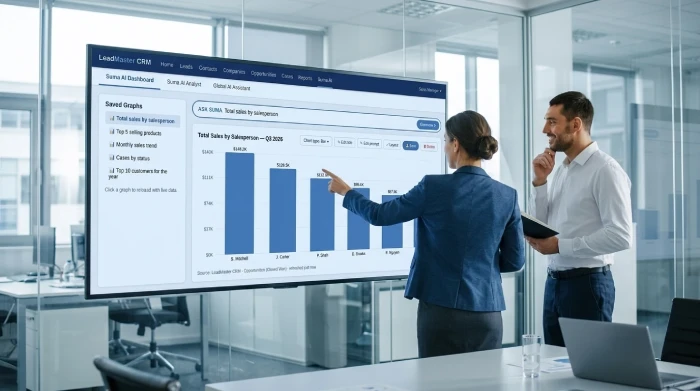
A sales manager wanted to see how each salesperson was performing without requesting a report. They typed "Total sales by salesperson" into Ask SUMA.
Suma AI built the matching chart in seconds. The manager changed the chart type, edited the title, adjusted the layout and saved the graph so it could be reloaded with current figures at any time.
AI answers had to be trusted before they could replace reports. Each module was tested against known reports and against unusual, incomplete and invalid questions, not only the normal successful path.
AI helped people get to the answer faster, while automation delivered, refreshed and shared that answer without someone doing it manually each time.
Ask a question such as "Total sales by salesperson" and get the matching graph; change type, title, prompt and layout, then save, reload or delete.
Questions return structured tables. Predefined questions include Total sales this month, Top 5 selling products and Top 10 Customers for the Year.
Turns any result table into several relevant charts with one click, providing multi-angle breakdowns and trend analysis instantly.
Searches the web in real-time for current market information, shows verifiable sources and lets users copy executive answers with one click.
Result values open the matching LeadMaster record directly; entire result tables export seamlessly to formatted PDF or raw CSV.
Popup shows description, email, phone, address, website and principals; conversation history and New Chat work across Analyst and Global AI.
The benefit came primarily from removing repetitive reporting work. Users spent less time waiting for and building reports, and more time acting on the answers.
Build a report or request a query
Type a question in plain English
Built manually, often out of date
Generated from a question, saved and reused
Exported to spreadsheets and charted by hand
Show Charts creates them from any result
Search the CRM separately
Click a linked value to open the record
Leave the CRM and search the web
Company Info and Global AI inside the CRM
Copy and paste into documents
One-click PDF or CSV export
Lost or re-run from scratch
Saved in conversation history
A credible improvement claim compares equivalent work before and after Suma AI. The figures below are sample data showing how the measurement is presented; they should be replaced with the client's actual baseline and post-rollout measurements.
25 hours (sample baseline) → 7 hours (sample)
1-2 business days (sample) → Near-instant (<30s sample)
60 requests/month (sample) → 15 requests/month (sample)
20 minutes (sample) → 3 minutes (sample)
10% (sample) → 80% (sample)
18 hrs/week saved × $45/hr × 52 weeks (sample)
Suma AI is built as a layer inside LeadMaster CRM rather than as a separate application. The user interface sits in the existing Classic ASP frontend, Suma AI services run in the C# Web API, and all questions are answered from the same SQL Server database that holds LeadMaster CRM data. The full solution is hosted on Microsoft Azure.
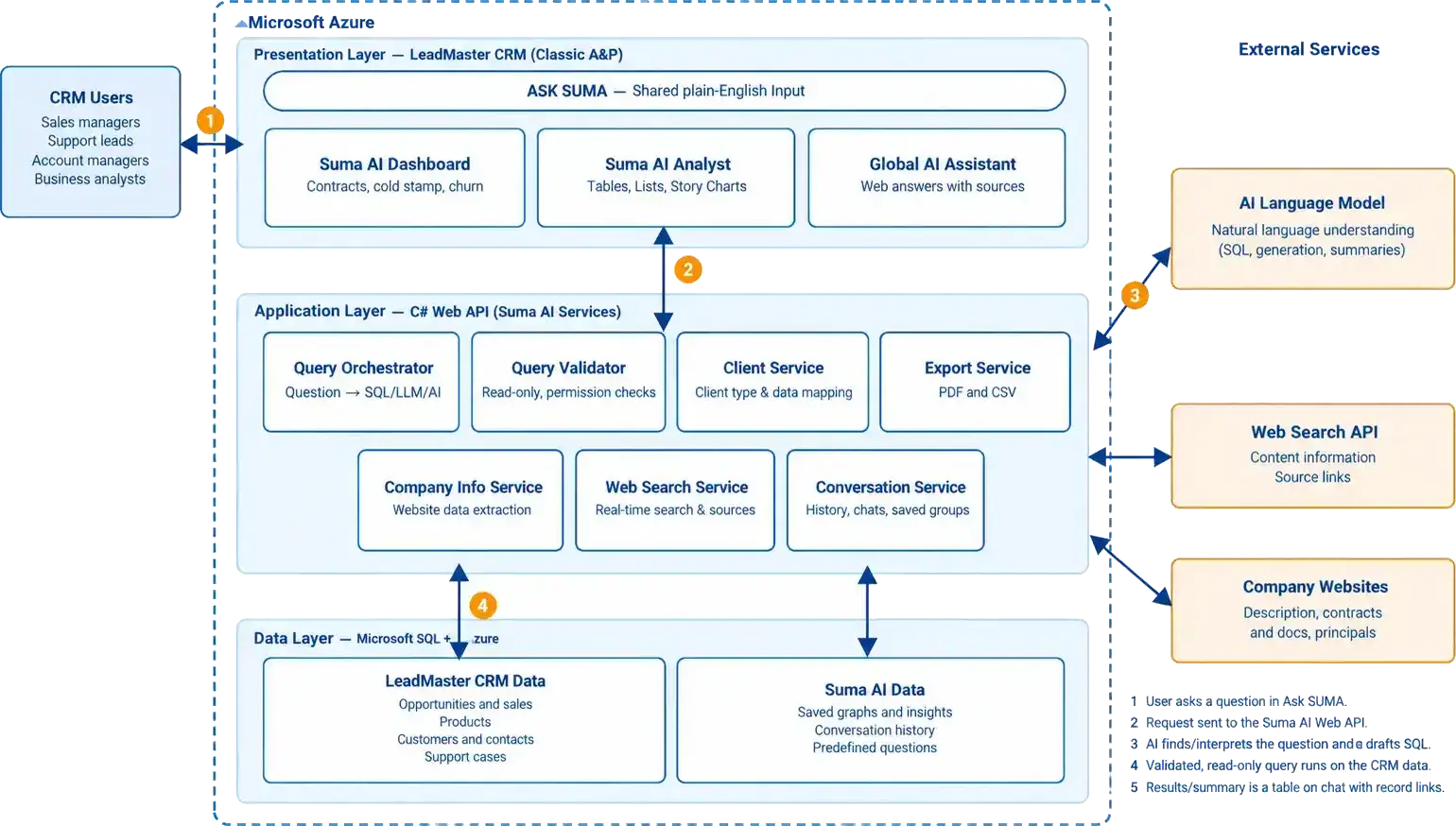
| Layer | Technology |
|---|---|
| CRM Platform |
LeadMaster CRM
|
| Frontend |
Classic ASP
|
| Backend |
C# Web API
|
| Database |
Microsoft
SQL Server
|
| Cloud |
Microsoft
Azure
|
| Layer | Technology |
|---|---|
| AI Capability |
Natural-language querying (Suma AI)
|
| Research |
Real-time web search with sources
|
| Visualization |
Charting and data visualization
|
| Export |
PDF and CSV
|
| Integrations |
LeadMaster record links and Company Info lookup
|
Suma AI connects the steps of everyday analysis rather than treating them as separate tools, functioning as an intelligent assistant rather than the final decision-maker.
A user asks a question. Suma AI answers from live CRM data as a table or chart. Linked values open the original LeadMaster record, Company Info and the Global AI Assistant add outside context, and the result is exported or saved to conversation history for the next decision.
Business definitions and metrics for predefined questions were strictly confirmed by LeadMaster domain owners.
Suma AI answers run only against approved CRM data with mandatory read-only validation preventing modifications.
AI-generated answers were thoroughly tested and reconciled against known historical reports before live release.
Every individual table value links directly back to the original LeadMaster record for instant human verification.
Web intelligence answers explicitly display cited sources so account managers can easily cross-examine data.
Sales, product, pricing, and customer relationship decisions remain firmly with LeadMaster's experienced managers.







Our sales manager reaches out to you within a few days after analyzing your business requirements.
Meanwhile, we sign an NDA to ensure the highest level of privacy.
Our pre-sale manager presents project estimates and an approximate timeline.


 AI Consulting Services
 RAG Development
 LLM Development
 AI App Development
 AI Software Development
 AI Integration Services
 AI Agent Development
 AI Chatbot Development
 LLM Fine-Tuning
 Generative AI Integration
 AI Copilot Development
 Data Analytics
 Data Warehousing
 Data Annotation
 AIOps
AIOps
 DevOps Consulting
 DevOps Automation
 SRE
SRE
 LLM Observability
 AI for Healthcare
 AI for CRM
 AI for Customer Support
 AI for Manufacturing
 AI for Real Estate
 AI for Education
 AI for Finance
 AI for E-Commerce
 AI/ML Consulting
 Object Detection
 ChatBot Development
 Computer Vision
 Natural Language Processing
 Data and Ai
 Mobile Apps Development
 Chrome Extension Development
 Odoo Development Services
 Odoo Implementation Services
 Odoo Customization Services
 Odoo Integration Services
 Odoo Migration & Upgrade Services
 Odoo ERP Consulting Services
 Odoo Support and Maintenance Services
 Odoo AI & Automation Services
 Salesforce Consulting
 Salesforce Product
 Salesforce Case Study
 SuiteCRM Consulting
 SuiteCRM Addons
 Devops
 AWS Consulting
 Digital Ocean Consulting
 OnPrem. Server Support
 Cloud Migration Services
 Salesforce WhatsApp Business API
 Salesforce WhatsApp Web Integration
 Salesforce Telephony Integration
 Dentrix To GHL
 Outlook Integration
 MindBody Integration
 Zillow Integration
 Open Dental To GHL
 Number Plate Recognition
 Taxi App & Mobility
 Smart Bus & Fleet System
 HR Solutions (Salesforce)
 Quick HRMS (SuiteCRM)
 CRM For Telecom Industry
 CRM For Travel
 CRM For Call Center
 CRM For Education
 CRM For Healthcare
 CRM For Clinics
 CRM For Locksmith
 CRM For Law
 NodeJS
 Python
 .NET
.NET
 Classic ASP
 Core PHP
 ReactJS
 AngularJs
 Android
 iOS
iOS
 Flutter
 React Native
 AR/VR
AR/VR
 CodeIgniter
 Laravel
 Hire .NET Core Developer
 Hire Salesforce Developer
 Hire Odoo Developers
 CRM For Legal Practice
 Online Photo Booking System
 Task Scheduler for Construction Industry
 Patient Management Software
 Dentist Management System
 Food Delivery App
 CRM For Aviation Company
 Salesforce Marketing Cloud for Online Retail Store
 Salesforce Implementation & Customization For RFID Supplier
 Ecommerce System Integration With ERP
 CRM For Real Estate Company
 Find Nearby Salon
 Taxi Booking App
 CRM For Travel Agency
 Case Management Software
 Engineering Company Website
 CRM For Telecom Industry
 Company Profile
 SuiteCRM Profile
 Telco CRM white paper
 AI enabled speech analysis