Pioneer in Offering CRM Solutions since 2010...
Pioneer in Offering CRM Solutions since 2010...

 ChatGPT Development
 Claude AI Development
 Gemini AI Development
 Microsoft Copilot Development
 DeepSeek AI Development
 LangChain Development
 CrewAI Development
 AutoGen Development
 LangGraph Development
 Pinecone Development
 Weaviate Development
 AI Workflow Automation
 Qdrant Development
 Cursor AI Consulting
 GitHub Copilot Consulting
 Enterprise AI Search
ChatGPT Development
Claude AI Development
Gemini AI Development
Microsoft Copilot Development
DeepSeek AI Development
LangChain Development
CrewAI Development
AutoGen Development
LangGraph Development
Pinecone Development
Weaviate Development
AI Workflow Automation
Qdrant Development
Cursor AI Consulting
GitHub Copilot Consulting
Enterprise AI Search
How an AI voice agent was added to the PBX so callers can be greeted, answered from a knowledge base, and handed to CRM actions or a human extension in one live phone conversation, in English or Hebrew
Call centers and sales teams often need to answer inbound calls when agents are busy, after hours, or when the request is a short qualification or FAQ. Putting callers on hold, missing the call, or forcing them through a rigid IVR menu loses context and time.
The conversation stays on one call session, so a follow-up such as a preferred time or a transfer request continues the same history. The reply language follows the agent instructions and the caller's language. Appointments, tickets, contacts and transfers follow the actions the administrator enabled.
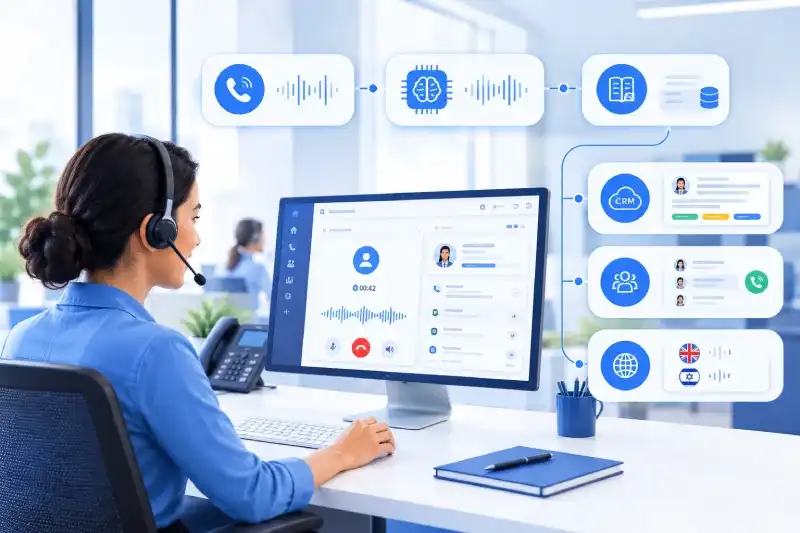
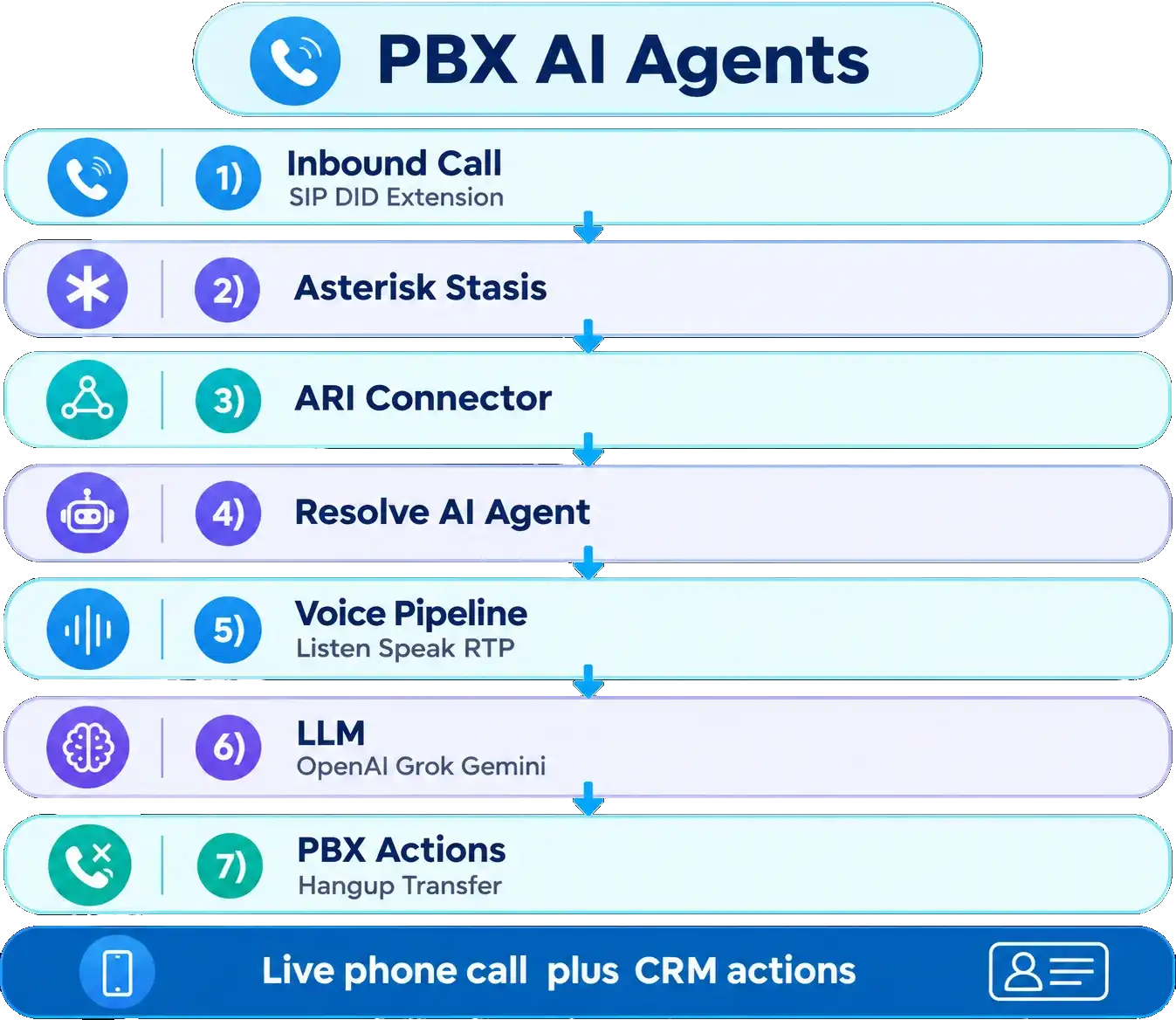
PBX AI Agents brings a configurable AI voice agent into the PBX and CRM. An administrator defines what the agent is allowed to say and do. When a call enters Stasis on the assigned DID or extension, the connector answers, listens over live RTP, and speaks through OpenAI audio or an STT-LLM-TTS pipeline.
Inbound callers need an answer while they are on the phone, not while they wait for a free human agent or navigate a long IVR tree.
Typical requests include: Ask about product, pricing or support hours, Qualify a lead and capture name, company or need, Create a ticket or appointment from the call, Transfer to a human when the caller asks for one, End the call politely when the request is complete
Doing this only with human agents means missed calls, long queues and inconsistent scripts. A separate chatbot does not hear the caller’s voice, does not sit on the PBX channel, and does not know which CRM actions or transfer extension the business approved.
The business requirement was to let the caller speak naturally, and to let the PBX agent answer from knowledge, run allowed CRM actions, and report what happened — all on the same live call.
PBX AI Agents was built as an administrator-configured voice agent for Asterisk and the CRM.
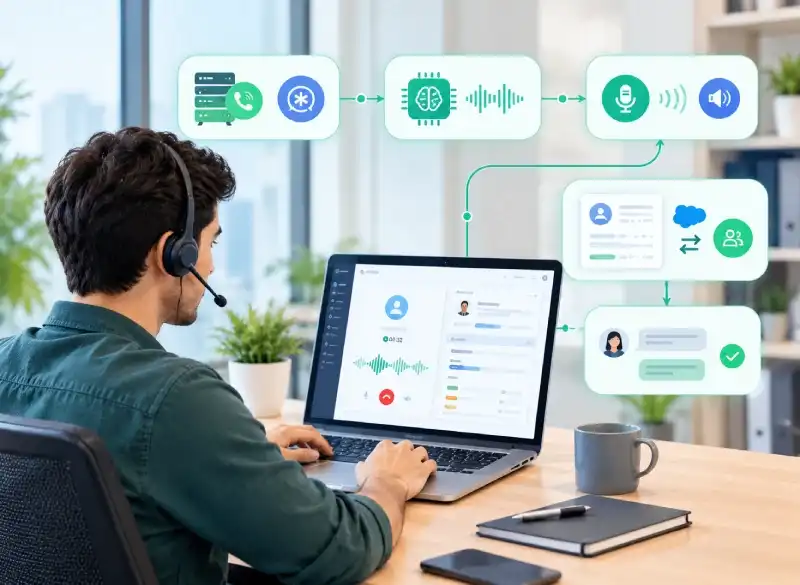
Administrators open PBX AI Agents settings and create an agent. They choose the provider and model, write the main instructions, attach knowledge and guardrails, assign PBX extensions, and turn on only the actions the business wants.
When a call hits Stasis, the connector answers the channel, opens ExternalMedia for live µ-law RTP, builds the system prompt, and runs turns through the configured voice pipeline. Each turn updates conversation history until the agent ends the call, transfers, or reaches the turn limit.
A follow-up utterance uses the same call history, so the CRM and the voice agent keep that conversation. This is separate from the CRM web login session.
The objective was not to let the model change the CRM without a result the caller and the business can trust.
The objective was to turn spoken speech into a short, natural reply, and — when configured — into a CRM search or create, a team assignment, or a live transfer.
Answer from the agent prompt, knowledge files and websites, and guardrails.
Greet the caller, keep replies short for phone latency, and continue multi-turn history.
End the call or transfer to a PBX extension when the guidelines say so.
Create or update a contact, create or search a ticket, add an event or a task when those actions are enabled.
Use OpenAI audio for voice-in / voice-out, or AssemblyAI STT plus LLM plus TTS.
Ask only when a value cannot be decided from the conversation.
| Capability | What it does |
|---|---|
| Live Answer | Answers the inbound channel in Stasis and speaks over RTP. |
| Knowledge Reply | Uses admin prompt, knowledge sources and guardrails as the source of facts. |
| End Call | Closes the conversation when guidelines are met ([END_CALL]). |
| Transfer Call | Transfers the live call to a configured PBX extension ([TRANSFER]). |
| Assign Team | Assigns the conversation to a team or user when enabled. |
| Create / Update Record | Creates or updates a contact (or selected module) from the call. |
| Ticket Actions | Creates or searches support tickets. |
| Appointment / Task | Adds an event or task with working hours and slot rules. |
| One Conversation | Call history and turn count stay on the active channel session. |
| Result on the Call | The caller hears the answer; the CRM receives the action outcome. |
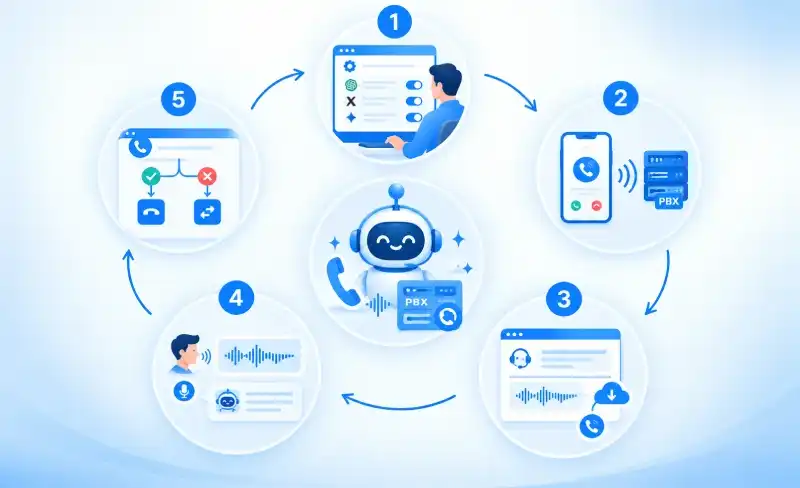
An administrator creates the agent, selects OpenAI, Grok or Gemini, sets speech keys if needed, writes instructions, attaches knowledge and guardrails, assigns extensions, and enables actions.
Asterisk sends the channel into Stasis(ai-compliance). The connector receives StasisStart with DID and caller ID.
It loads the agent (from CRM tenant lookup or static config), builds the system prompt, answers the channel, and creates ExternalMedia so voice flows as live RTP to the CRM host.
VAD detects the end of speech. The voice pipeline (openai_audio or stt_llm_tts) produces a short spoken reply. Optional barge-in stops playback when the caller speaks again.
If the model signals end or transfer, the connector hangs up or redirects. Otherwise it resumes listening until max turns.
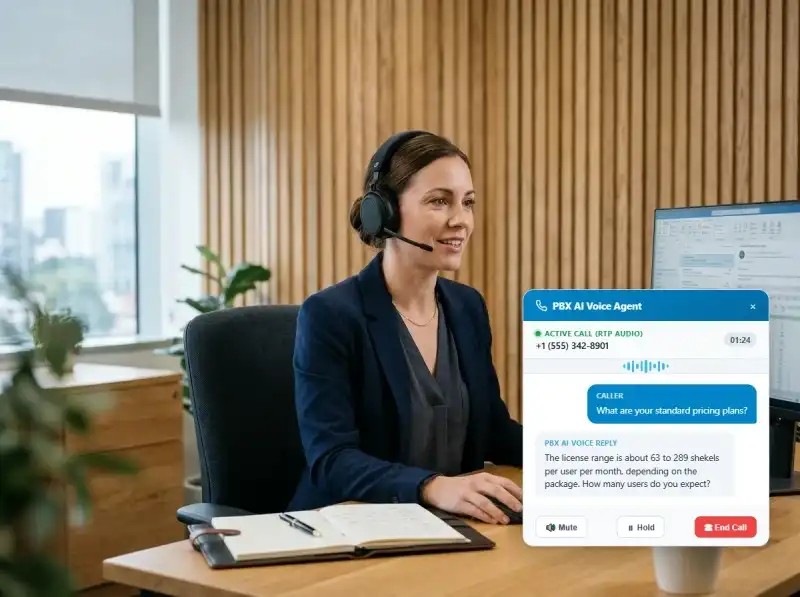
The caller asks about pricing or product fit. The agent replies only from the knowledge base and prompt, keeps the answer to one or two short sentences, and asks one clarifying question when needed.
The caller dials in asking about license pricing, product suitability, or operating hours.
The agent references the knowledge files and system prompt, formulating a concise response designed for phone latency.
“The license range is about 63 to 289 shekels per user per month, depending on the package. How many users do you expect?”
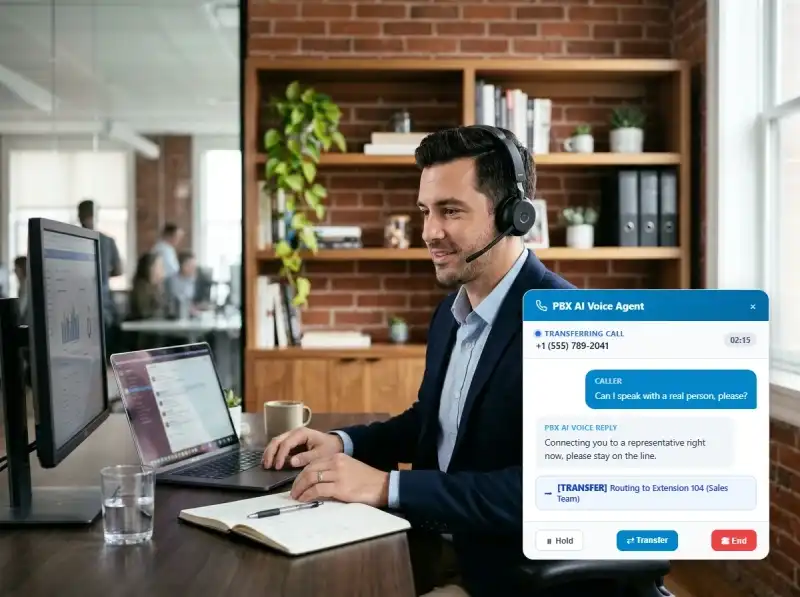
The caller asks for a person. The agent speaks a brief handoff line, then writes [TRANSFER]. The connector transfers to the configured extension. The CRM can also assign a team task when that action is enabled.
The caller requests to talk with an agent or support representative.
The agent speaks a polite handoff message and writes [TRANSFER] to the telephony connector.
The connector redirects the live call to the assigned PBX extension and logs a team task in the CRM.
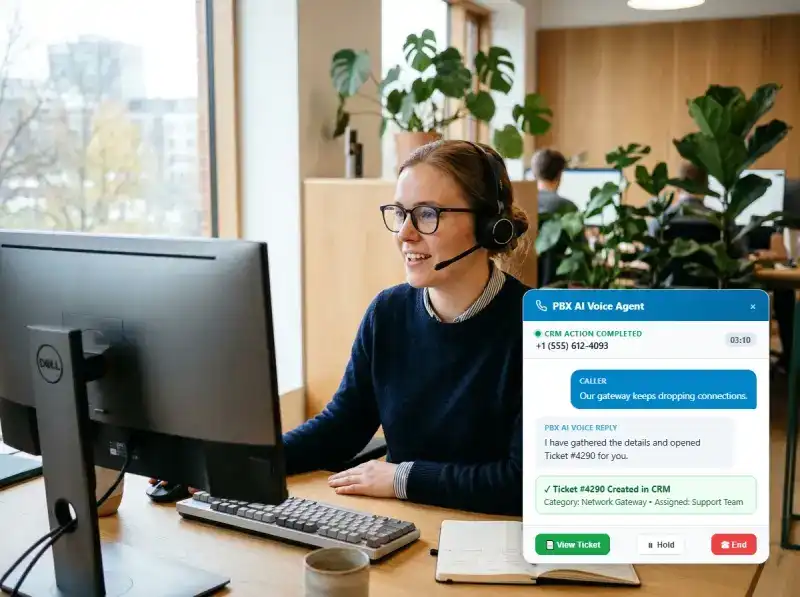
The caller reports an issue. With Create Ticket enabled, the agent gathers the missing title or details across turns, creates the ticket as the configured CRM flow allows, and tells the caller the ticket was opened — or that it was not created.
The caller calls regarding a technical difficulty or customer support problem.
With Create Ticket enabled, the agent captures the title, problem description, and caller details across spoken turns.
The ticket is created in the CRM according to business rules, and the caller is verbally informed of the ticket outcome.
Meaning: Call just answered; first spoken turn.
Connector Action: Speak greeting, then listen.
Meaning: Waiting for caller speech (VAD / RTP).
Connector Action: Buffer utterance; start next AI turn.
Meaning: AI audio is being injected as RTP.
Connector Action: Pace playback; allow barge-in if enabled.
Meaning: Hangup, transfer or max turns.
Connector Action: Drop ExternalMedia and clear the call.
The connector always tracks: system_prompt — built once per call from agent, knowledge and guardrails (or static prompt.txt), history — recent user and assistant turns for the LLM, action — hangup or transfer when the model signals it, transfer_extension — the PBX destination when transfer is enabled.
In simple terms, the caller talks to the phone line, and the CRM remains the system that stores records and action rules while the PBX remains the system that carries the live call.
API keys stay on the server (CRM agent record or socket config). The PBX does not receive the provider key. The same call behavior is used whichever provider is selected for the text LLM path.




Callers wait in queues, suffer long hold times, or abandon calls when human agents are occupied.
Answers immediately on the Stasis app instead of waiting for a free agent.
Human staff repeatedly answer routine questions and manually open CRM forms.
Speaks from knowledge without opening a desktop form.
Manual call transfers often drop, misroute, or force callers to repeat information.
Hands off to an extension when the caller asks for a human.
Agents manually record notes, create tickets, or log appointments after the call ends.
Creates contacts, tickets, events or tasks from the call when enabled.
Calls go to voicemail or ring unanswered when staff is offline.
Keeps a consistent script and language without staffing every minute.
Context is lost when callers clarify requests, requiring restarting explanations.
History stays on the channel so the next sentence continues the request.
Inconsistent service, missed business opportunities, and high human overhead.
The caller hears the answer; the business sees the CRM outcome.
Callers get an answer on the first ring path instead of waiting in a long queue for every FAQ.
Qualification and booking can continue when human agents are busy or offline.
The agent can ask for a missing detail and finish the same request on the next utterance.
Administrators write the instructions, knowledge and guardrails that shape every reply.
Only enabled actions run, and transfer goes only to the configured extension.
End call, transfer or continue listening — the connector always knows the next telephony step.
The agent runs only for calls that enter the configured Stasis application. CRM actions follow the agent configuration and signed-in CRM rules where applicable.
Administrators control:
API keys are stored with the agent or in socket config and are not exposed to the caller or the PBX dialplan. Prompt and knowledge can also be loaded statically to remove master/tenant DB latency on the call path.
The same pattern can grow without changing how Asterisk holds the live call.
Richer CRM updates from a follow-up utterance on the same call.
More modules, using the same action framework.
Deeper real-time streaming models for lower time-to-first-audio.
Usage and call outcome history for administrators.
Richer post-call summaries saved to the CRM.
If something necessary is still missing, the agent asks, the caller speaks again on the same channel, and the original request continues.
The agent does not silently invent a person, company or ticket that was never mentioned. It asks.
It does decide the values a phone agent would expect it to decide:







Our sales manager reaches out to you within a few days after analyzing your business requirements.
Meanwhile, we sign an NDA to ensure the highest level of privacy.
Our pre-sale manager presents project estimates and an approximate timeline.


 AI Consulting Services
 RAG Development
 LLM Development
 AI App Development
 AI Software Development
 AI Integration Services
 AI Agent Development
 AI Chatbot Development
 LLM Fine-Tuning
 Generative AI Integration
 AI Copilot Development
 Data Analytics
 Data Warehousing
 Data Annotation
 AIOps
 DevOps Consulting
 DevOps Automation
 SRE
 LLM Observability
 AI for Healthcare
 AI for CRM
 AI for Customer Support
 AI for Manufacturing
 AI for Real Estate
 AI for Education
 AI for Finance
 AI for E-Commerce
 AI/ML Consulting
 Object Detection
 ChatBot Development
 Computer Vision
 Natural Language Processing
 Data and Ai
 Mobile Apps Development
 Chrome Extension Development
 Odoo Development Services
 Odoo Implementation Services
 Odoo Customization Services
 Odoo Integration Services
 Odoo Migration & Upgrade Services
 Odoo ERP Consulting Services
 Odoo Support and Maintenance Services
 Odoo AI & Automation Services
 Salesforce Consulting
 Salesforce Product
 Salesforce Case Study
 SuiteCRM Consulting
 SuiteCRM Addons
 Devops
 AWS Consulting
 Digital Ocean Consulting
 OnPrem. Server Support
 Cloud Migration Services
 Salesforce WhatsApp Business API
 Salesforce WhatsApp Web Integration
 Salesforce Telephony Integration
 Dentrix To GHL
 Outlook Integration
 MindBody Integration
 Zillow Integration
 Open Dental To GHL
 Number Plate Recognition
 Taxi App & Mobility
 Smart Bus & Fleet System
 HR Solutions (Salesforce)
 Quick HRMS (SuiteCRM)
 CRM For Telecom Industry
 CRM For Travel
 CRM For Call Center
 CRM For Education
 CRM For Healthcare
 CRM For Clinics
 CRM For Locksmith
 CRM For Law
 NodeJS
 Python
 .NET
 Classic ASP
 Core PHP
 ReactJS
 AngularJs
 Android
 iOS
 Flutter
 React Native
 AR/VR
 CodeIgniter
 Laravel
 Hire .NET Core Developer
 Hire Salesforce Developer
 Hire Odoo Developers
 CRM For Legal Practice
 Online Photo Booking System
 Task Scheduler for Construction Industry
 Patient Management Software
 Dentist Management System
 Food Delivery App
 CRM For Aviation Company
 Salesforce Marketing Cloud for Online Retail Store
 Salesforce Implementation & Customization For RFID Supplier
 Ecommerce System Integration With ERP
 CRM For Real Estate Company
 Find Nearby Salon
 Taxi Booking App
 CRM For Travel Agency
 Case Management Software
 Engineering Company Website
 CRM For Telecom Industry
 Company Profile
 SuiteCRM Profile
 Telco CRM white paper
 AI enabled speech analysis